TAP / CLICK A SEGMENT TO EXPLORE MY SKILLS→
01 // ENGINEERING ARCHIVE
Selected Engineering Practice
SOFTWARE ENGINEERING / MACHINE LEARNING / DATA
MSc RESEARCH // FLAGSHIP2026
FreeFrom14
Making allergen-aware recipe discovery easier to navigate.
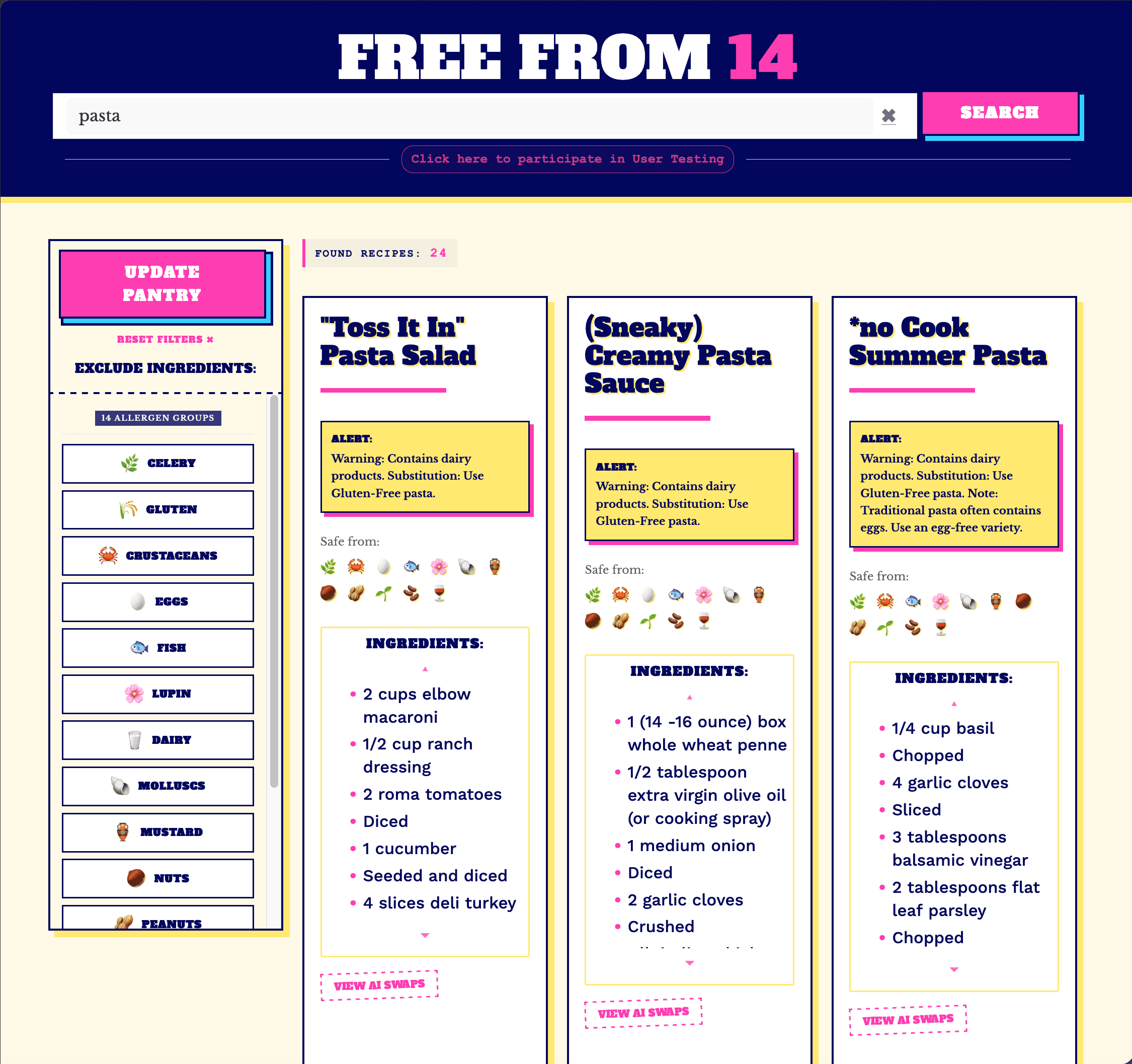
An MSc research project exploring how NLP and faceted search could make allergen-aware recipe discovery easier to navigate. I built a full-stack prototype that combines structured allergen filtering with a hybrid NLP pipeline using rule-based matching, spaCy NER and Word2Vec semantic substitutions, while moving to a tiered approach to ethical data acquisition.
AUDITED
7,500
RECIPES
CLEANED
1,419
FALSE FLAGS
SEARCH
14
ALLERGEN GROUPS
#HTML/CSS/JS/PHP#PYTHON#MACHINE-LEARNING#R/POSTGRESQL
MACHINE LEARNING // FEATURED2025
CIFAR-10
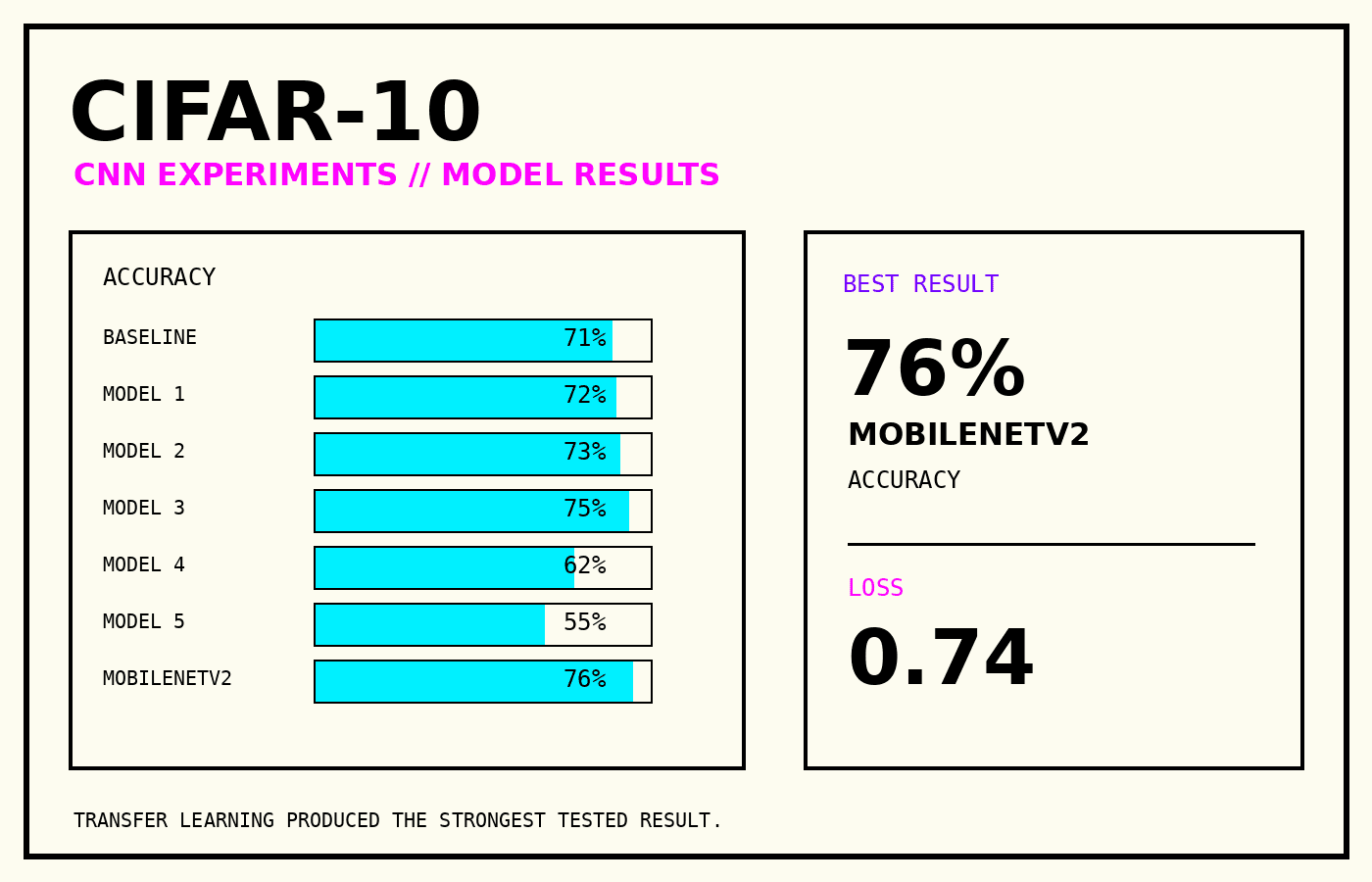
Explored CNN architecture, regularisation and transfer learning for image classification, comparing several model variations before testing MobileNetV2.
#PYTHON#TENSORFLOW#KERAS#CNN
MACHINE LEARNING // SUPPORTING2025
Breast Cancer Classification
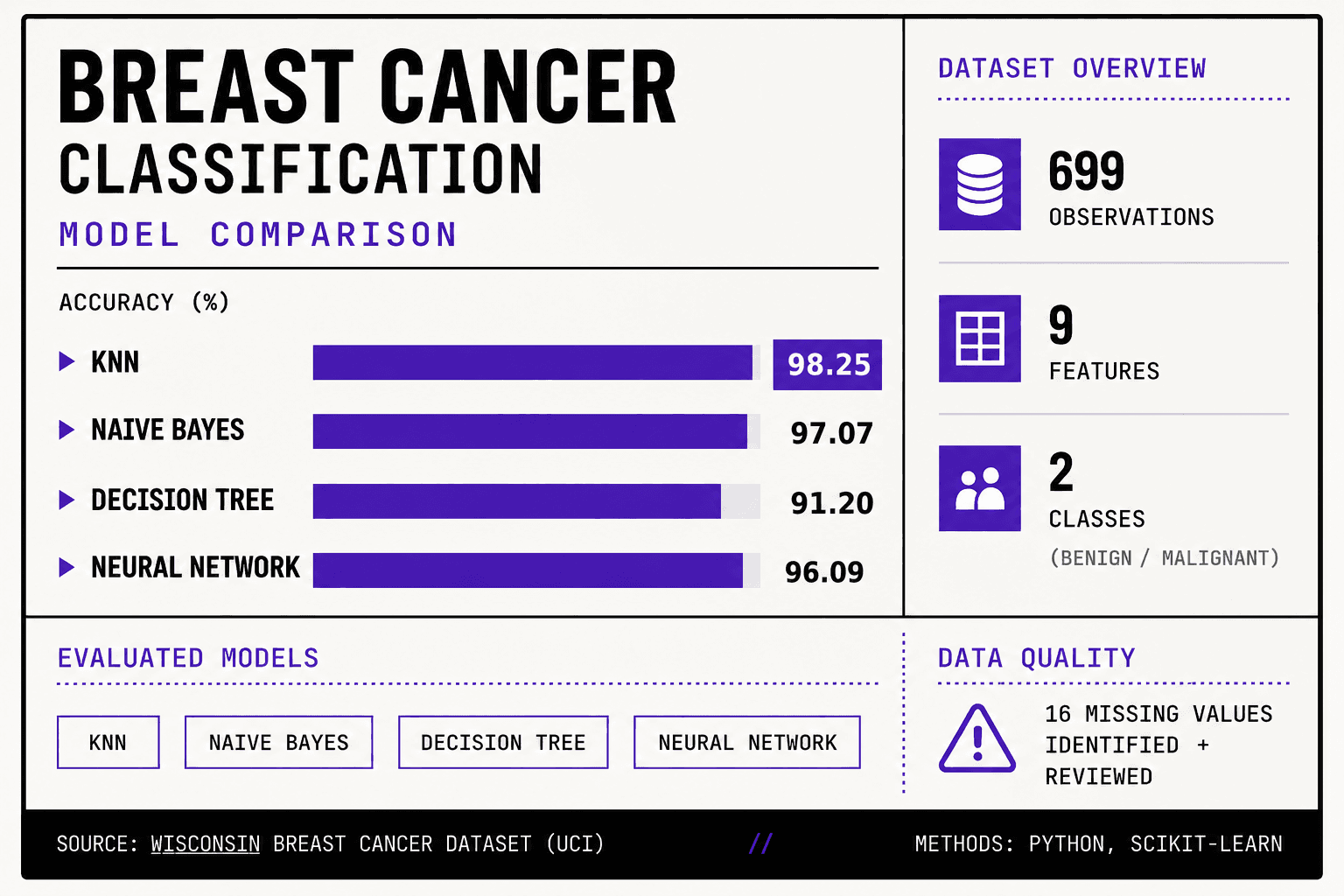
Compared multiple supervised learning approaches, examining preprocessing, missing data and classification performance across several models.
#R#KNN#NAIVE-BAYES#NEURAL-NETWORK
SOFTWARE ENGINEERING // FEATURED2025
WearView Academy
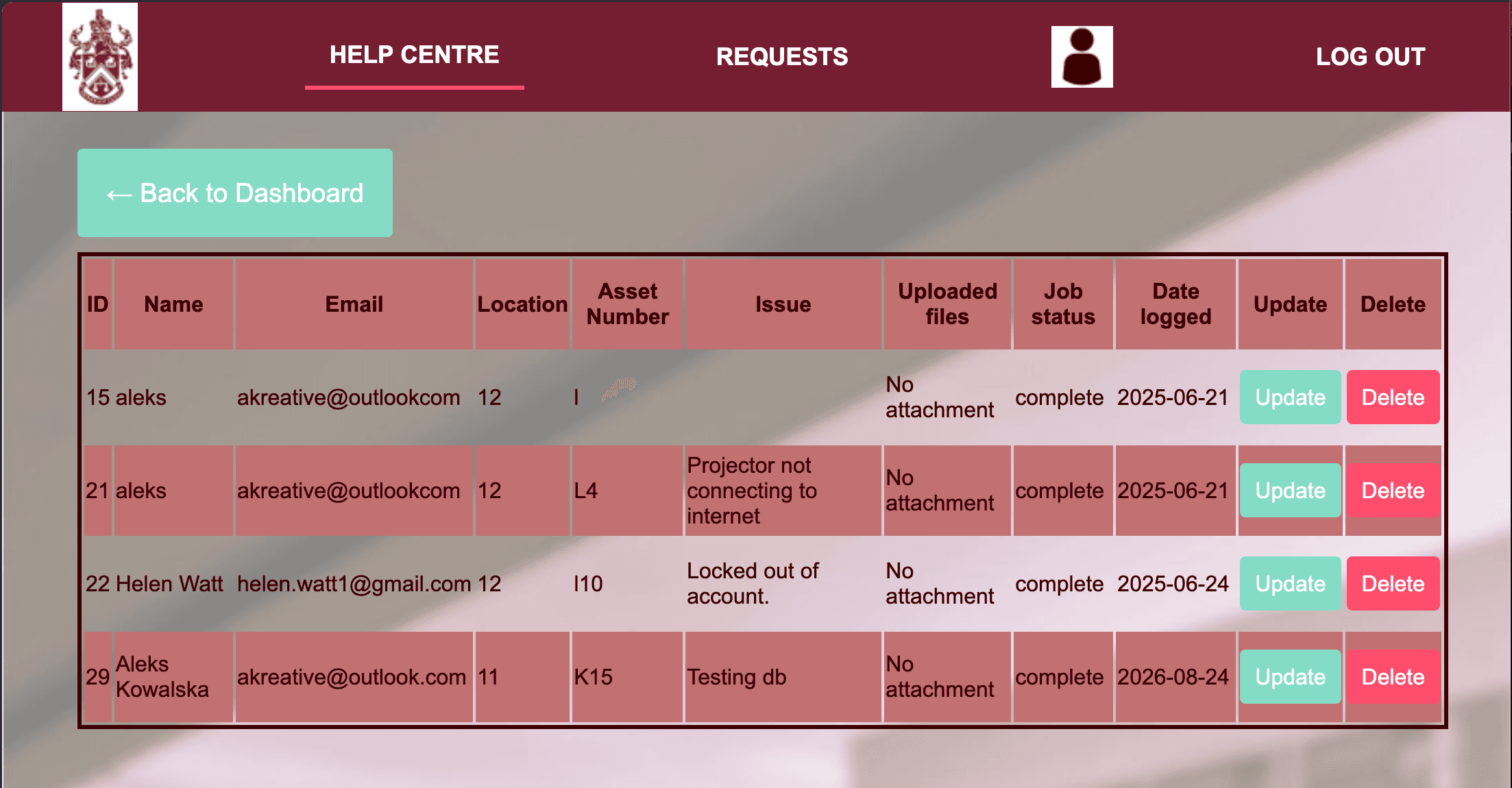
A web-based IT support management system for reporting, tracking and updating school IT issues, built with PHP, JavaScript and a relational database.
#PHP#SQL#JAVASCRIPT#SECURITY
MACHINE LEARNING // SELECTED2025
Bank Marketing
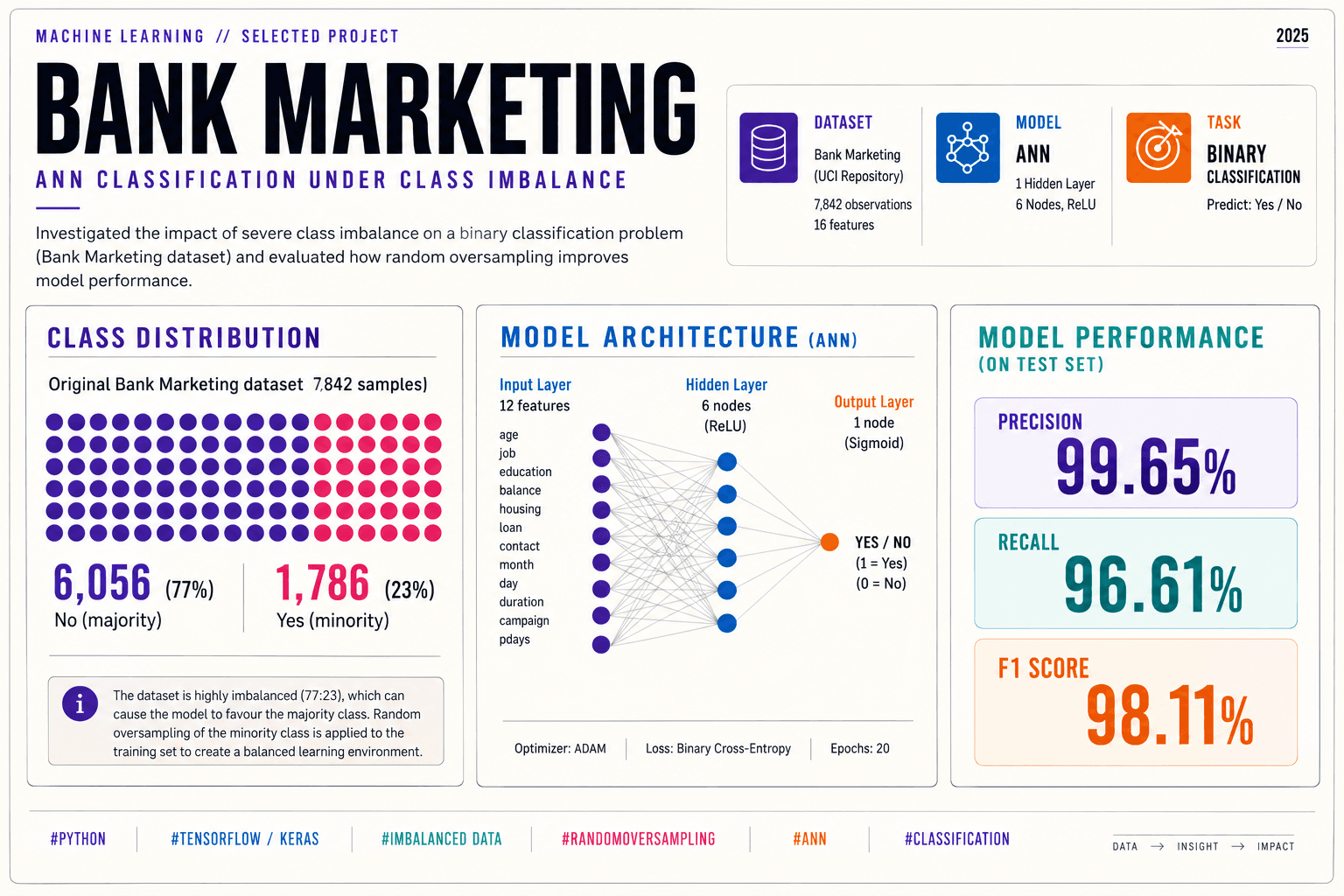
Exploring artificial neural networks for binary classification, with a particular focus on class imbalance, oversampling and network architecture.
TASK
BINARY
CLASSIFICATION
FOCUS
IMBALANCE
DATA + MODELLING
ANN
12
HIDDEN NODES
#PYTHON#ANN#CLASSIFICATION#OVERSAMPLING
PYTHON // MINI PROJECT2025
Quiz
A command-line true-or-false quiz built in Python, using functions, dictionaries, input validation and score tracking for multiple players.
QUESTIONS
10
INPUT
T / F
PLAYERS
MULTI
#PYTHON#FUNCTIONS#VALIDATION
PYTHON // PROJECT2025
Library Catalogue
A Python-based library management system exploring object-oriented programming, catalogue operations and book borrowing logic.
LANGUAGE
PYTHON
FOCUS
OOP
SYSTEM
LOANS
#PYTHON#OOP#LIBRARY-SYSTEMS#DATA_STRUCTURES
02 // VISUAL ARCHIVE
Earlier Creative Practice
Selected work from an earlier design practice spanning graphic design, editorial systems, photography and visual experimentation.
GRAPHIC DESIGN
COLLEGE + BA
COLLEGE + BA
// SELECTED ARCHIVE MATERIAL01 / —
BA GRAPHIC DESIGN // FEATURED2014
COMPETITION WINNER
Portraits 2014
An exhibition identity exploring stereotyping, judgement and hidden identity through layered portraiture, colour and a four-gallery visual system.
#PORTRAITURE#VISUAL_IDENTITY#TYPOGRAPHY#EXHIBITION
CLICK TO EXPLORE PROJECT →

PRIMARY ARTWORK01 / 01
TYPOGRAPHY STUDY
BA GRAPHIC DESIGN2014
Typography Specimen
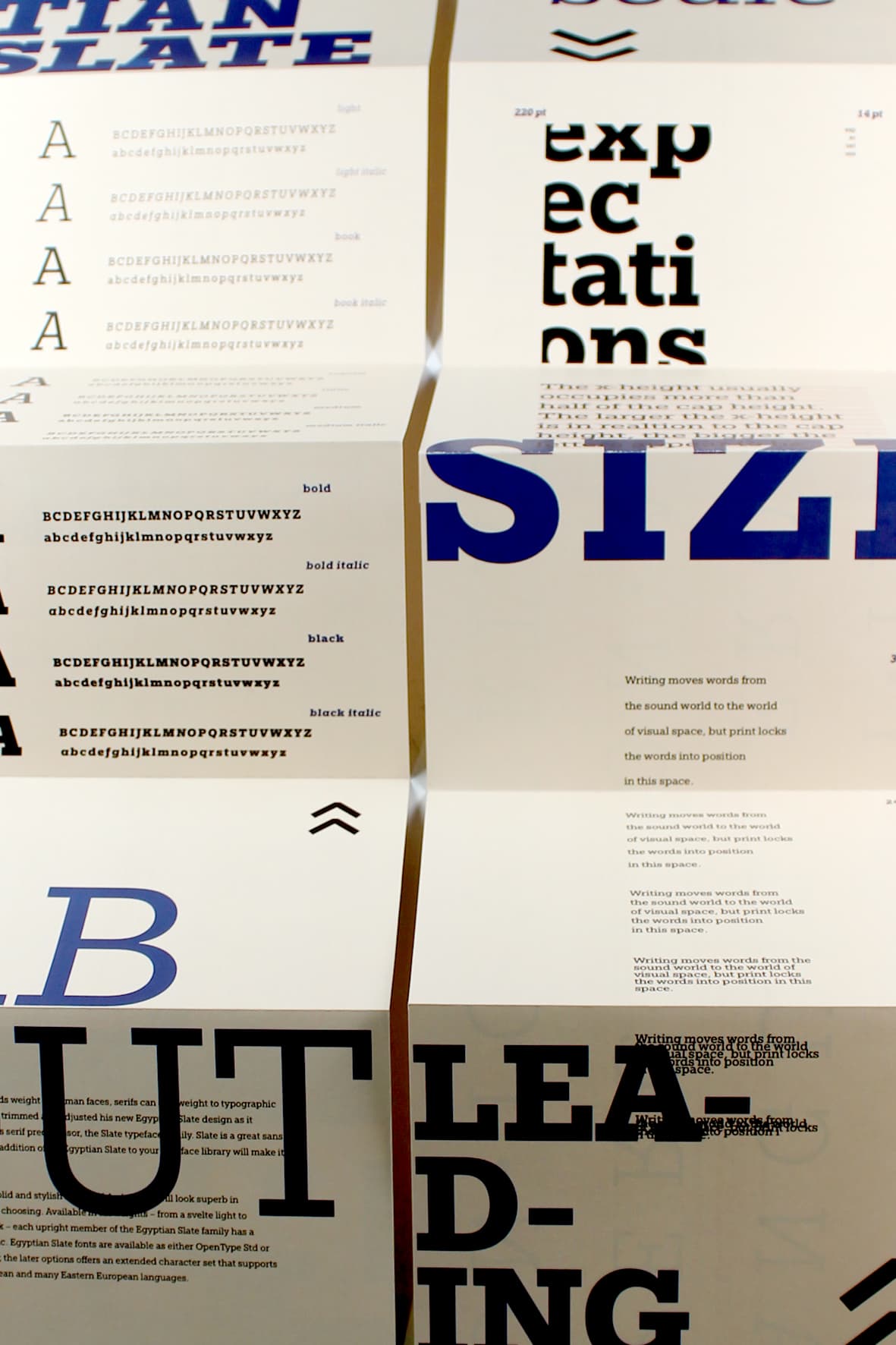
An experimental type specimen exploring hierarchy, scale, spacing, glyphs and typographic composition through print and digital presentation.
#TYPE#EDITORIAL#LAYOUT#WEB
BA GRAPHIC DESIGN // PERSONAL ETHOS2014
Manifesto
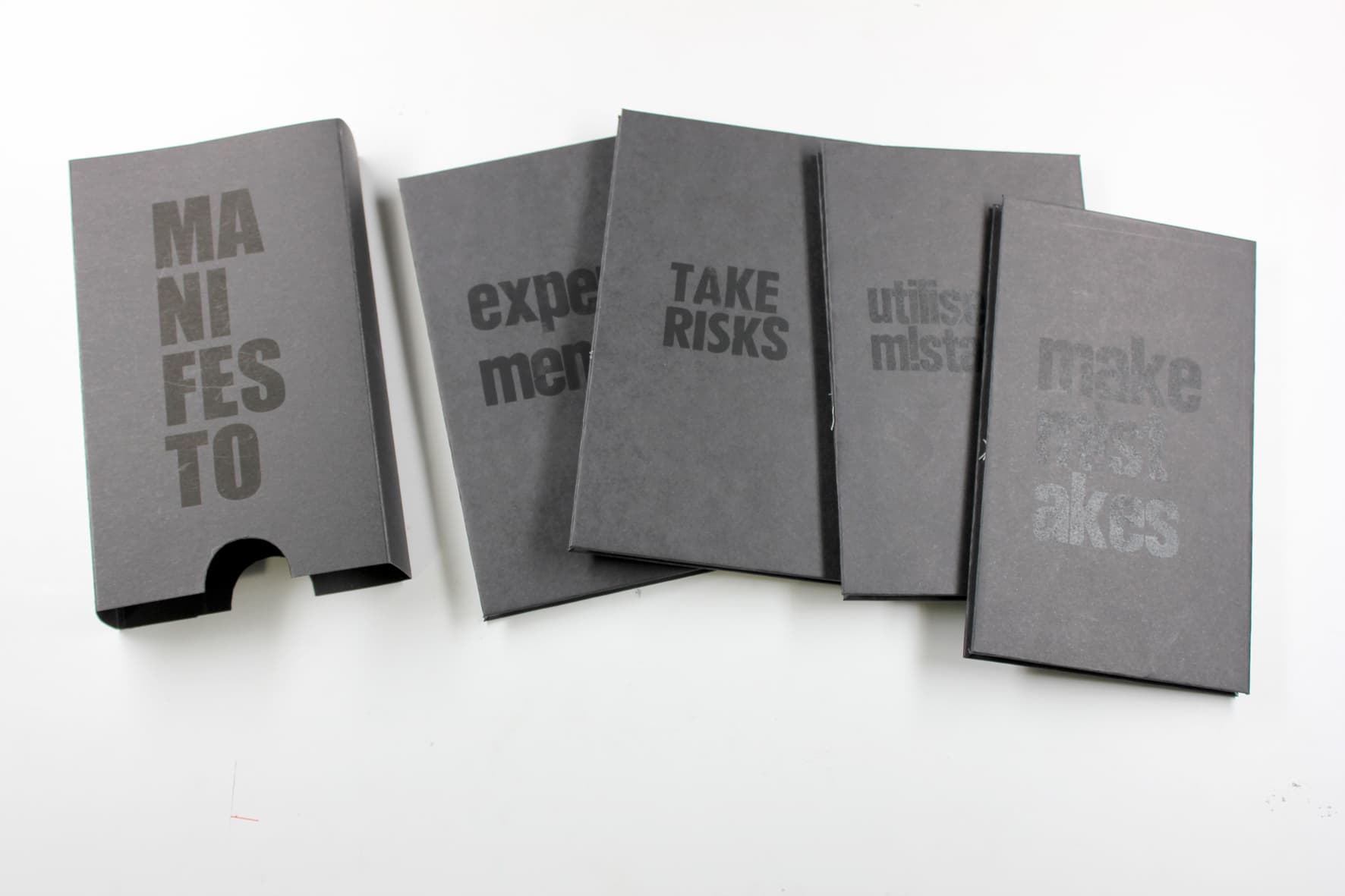
A print-led exploration of personal creative principles, using experimentation, controlled mistakes, glitch processes and mixed media to turn failure into visual material.
#GLITCH#LETTERPRESS#BOOK-DESIGN#EXPERIMENTATION

DISTINCTION
EARLY PRACTICE // PRINTCOLLEGE
Student Handbook
Editorial handbook designed for international students, combining information architecture, photography, typography and layered print treatments.
#EDITORIAL#TYPOGRAPHY#PHOTOGRAPHY#PRINT
// A LITTLE ABOUT HOW I THINK
HOW I THINK, WORK & BUILD
[ 01 // THE_FOUNDATION ]
I have an MSc in Computer Science (Distinction) and a BA in Graphic Design (2:1). For me, technology and design have always been closely connected. I like understanding how things work, figuring out why they don't, and finding ways to make them better. I care about building software that is useful, accessible and thoughtfully made.
[ 02 // THE_EXPERIENCE ]
A lot of my problem-solving mindset comes from working in an acute emergency general surgery environment. Before becoming a software engineer, I spent years working where things could change quickly and getting the details right mattered. Managing patient information, busy workflows and competing priorities taught me to stay organised, communicate clearly and think calmly when things don't go to plan.
[ 03 // THE_APPROACH ]
I don't panic easily. When something goes wrong, my first instinct is to understand the problem, work out what matters most and start fixing it. I'm naturally diplomatic and I value clear communication, especially when people have different priorities or perspectives. I enjoy solving problems, working things through with others and finding practical solutions rather than making things more complicated than they need to be.

02 // REAL-WORLD OPERATIONAL HISTORY & EDUCATION
MSc in Computer Science
GRADUATED // 2026University of Sunderland
// CLASSIFICATION: DISTINCTION RECIPIENT ★
Advanced core modules in Software Engineering, Data Structures & Algorithms, Database Systems Normalisation, and Full-Stack Architecture Development.
Ward Clerk — Acute Emergency General Surgery
AUG 2018 – PRESENTSouthampton General Hospital
- Keep things moving smoothly on a fast-paced ward, managing patient records and tracking live queues under pressure.
- Collected patient metrics to support expansion planning, contributing to the development of a custom Same Day Emergency Care pathway.
Housekeeper & Hostess
SEP 2014 – AUG 2018Southampton General Hospital
Maintained meticulous cleanliness, safety layout routines, and logistical flows to satisfy strict healthcare clinical parameters.
BA (Hons) in Graphic Design
GRADUATED // 2014University of Southampton
Focused on Swiss typographic layout design systems, complex information mapping frameworks, advanced editorial layout geometry, and brand identity architecture.
BTEC National Diploma in Art & Design (Graphic Design)
GRADUATED // 2011Northampton College
A multidisciplinary creative foundation spanning graphic design, motion graphics, photography, and illustration.
Industrial Printer / Screen Technician
SEPT 2007 – AUG 2009Ritter UK — Innovations in Plastics, Wrexham
Calibrated, adjusted, and managed heavy mechanical silk-screen hardware configurations safely under tight production schedules.
© 2026 ALEKSANDRA KOWALSKACURATED INDUSTRIAL REVOLUTION // NEXT.JS + TAILWIND v4
// Project overview
MSc Computer Science // Research Project // 2026
FreeFrom14
Making allergen-aware recipe discovery easier to navigate.
PROJECT
MSc RESEARCH
DATA
7,500 RECIPES
NLP
HYBRID APPROACH
EVALUATION
16 PARTICIPANTS
01 // The Problem
The problem wasn't finding recipes.
It was trusting them.
For people managing food allergies, finding something to cook can involve far more than typing a recipe into a search bar. Recipe information can be inconsistent and unstructured, requiring users to manually inspect ingredients and repeatedly make decisions about what to avoid.
FreeFrom14 explored how structured data, faceted search and natural language processing could help make allergen-aware recipe discovery easier to inspect and navigate.
02 // The Question
Can intelligent search make allergen-aware recipe discovery easier?
DATA
How can recipe information be responsibly acquired, audited and structured?
SEARCH
Can faceted filtering help users navigate complex restrictions?
NLP
Can semantic techniques improve ingredient understanding beyond exact keyword matching?
RESPONSIBILITY
How can transparency and data integrity be prioritised in an allergen-aware context?
03 // The Pivot
When the research changed the build.
The original project explored web scraping as a method of acquiring recipe data. As the research progressed, questions around permissions, provenance, reliability and ethical data acquisition became increasingly important.
Rather than forcing the original approach, I reassessed the data pipeline and explored more controlled sources, including authorised APIs and open datasets.
The goal wasn't simply to collect more data. It was to build a pipeline I could better understand, justify and audit.
04 // The System
From fragmented data to structured search.
DATA → PROCESSING → INTELLIGENCE → DELIVERY
01
DATA SOURCES
Authorised APIs + open datasets
02
INGESTION
Python processing pipeline
03
TRANSFORMATION
Clean + normalise recipe data
04
ALLERGEN ENRICHMENT
Structure information around 14 allergen groups
05
NLP
Regex + spaCy NER + Word2Vec
06
DATABASE
PostgreSQL via Supabase
07
APPLICATION
Flask + responsive interface
05 // The Intelligence
Why one method wasn't enough.
The first approach used strict keyword matching. It was fast and understandable, but recipe language is rarely that tidy. Different ingredients and ways of describing the same thing could leave gaps in what the system recognised.
INCREASING SEMANTIC FLEXIBILITY
01
SYMBOLIC BASELINE
REGEX / RULE-BASED MATCHING
Deterministic rules for known patterns, structured terms and explicit ingredient signals.
02
ENTITY EXTRACTION
spaCy NER
Used to identify ingredient-related entities in less structured recipe text.
03
SEMANTIC EXPLORATION
WORD2VEC
Used to explore semantic relationships between ingredients and potential substitutions.
WHY HYBRID?
The project explored how deterministic rules and semantic NLP could complement one another rather than treating one technique as a complete replacement for the others.
WORD2VEC CONFIGURATION
vector_size=200 · window=3 · min_count=2 · sg=1
TOOLS, METHODS & INFRASTRUCTURE
PYTHON
FLASK
POSTGRESQL
SUPABASE
SPACY
WORD2VEC
REGEX / RULES
JINJA2
HTML / CSS
JAVASCRIPT
PYTEST
OPEN DATA / APIS
Technologies and methods used across data acquisition, NLP, database design, application development and evaluation.
06 // The Search Experience
Search should support exploration, not create more work.
SEARCH / FILTER
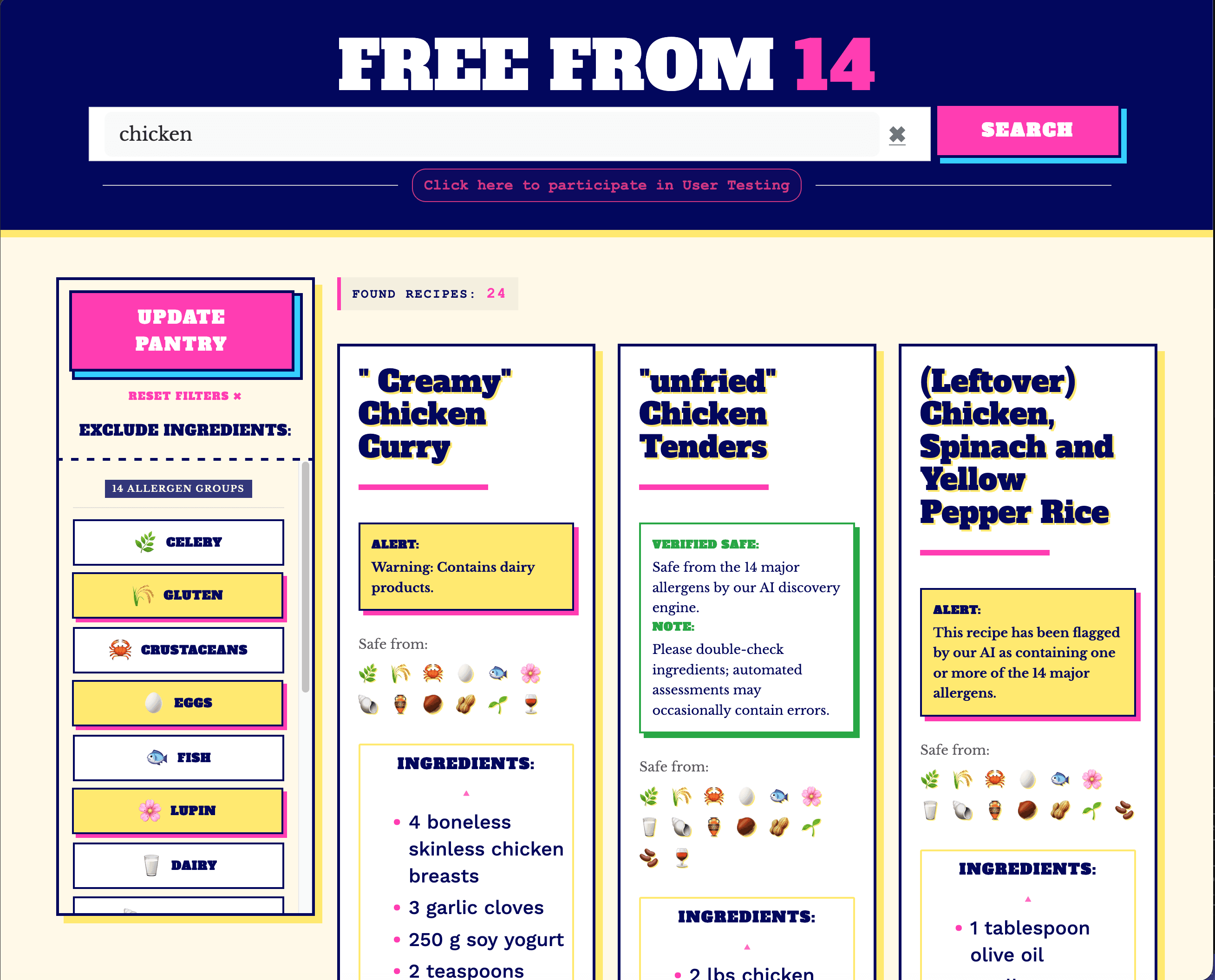
Progressive recipe discovery
14 ALLERGEN GROUPS
Structured around the major allergen categories recognised by UK/EU legislation.
MULTIPLE FILTERS
Supporting more complex combinations of exclusions.
EXPLORATORY SEARCH
Allowing users to progressively refine results.
SUBSTITUTION EXPLORATION
Moving beyond a simple include-or-exclude response.
The aim wasn't to make dietary decisions for the user. It was to make complex recipe information easier to inspect and navigate.
// KEY DESIGN SHIFT
From exclusion
to substitution.
Instead of stopping at an allergen warning, the project explored how semantic relationships could help users discover functional alternatives.
EXCLUDED
HONEY
→
EXPLORE
MOLASSES
Semantic relationship explored through Word2Vec

SEMANTIC SUBSTITUTION
From exclusion to exploration
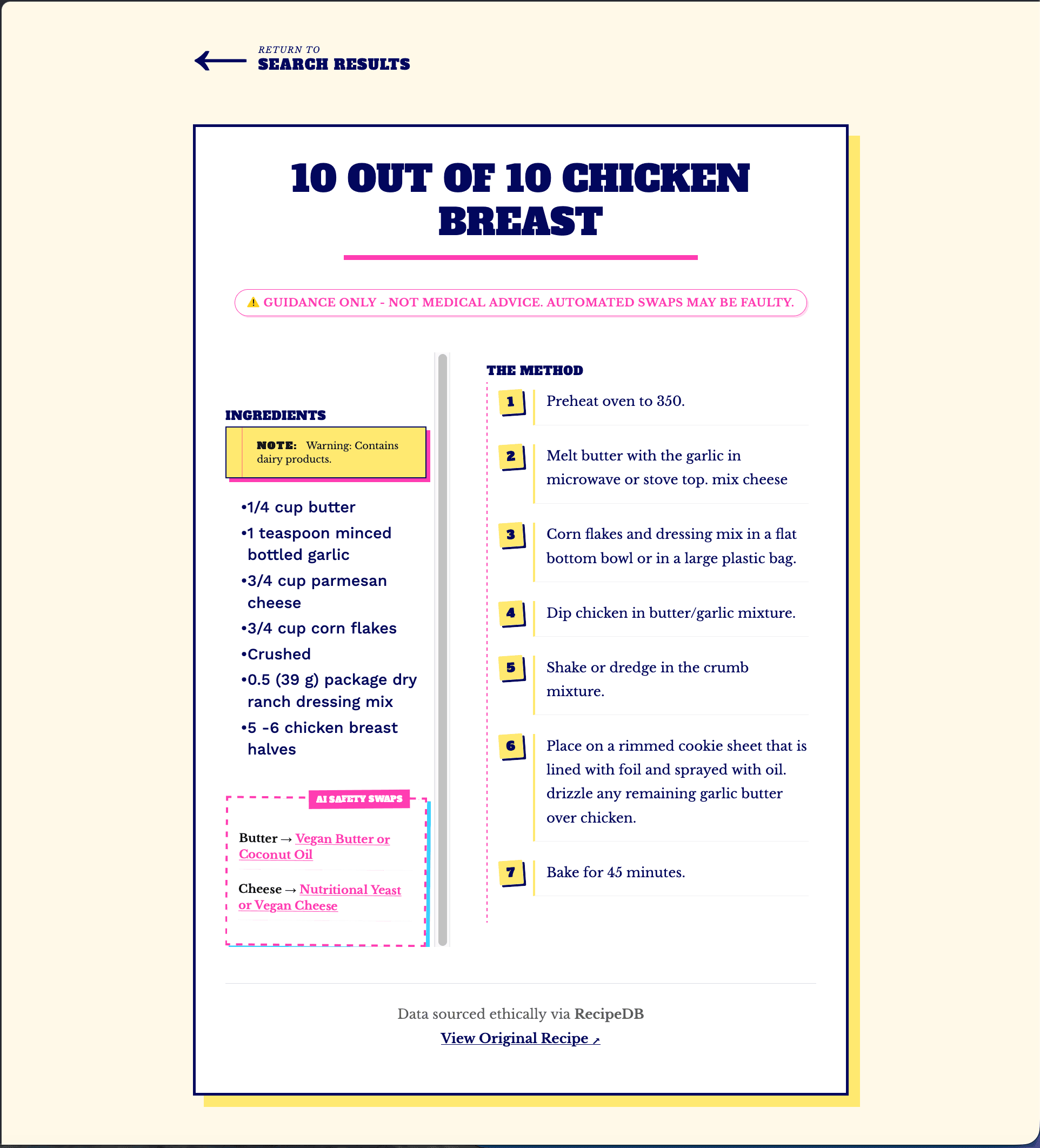
RECIPE DETAIL
Allergen-aware recipe view
07 // Testing & Results
The system had to be tested — not just built.
Evaluation combined technical testing with user feedback, allowing the project to look beyond whether the search worked and ask whether it was understandable, usable and useful.
7,500
Recipes evaluated
1,419
Erroneous flags removed
16
User test participants
89.6
Composite usability / 100
< 5 sec
Average allergen identification
17.94%
Tree Nut false-positive reduction
TASK 02
Search & Filter
100%
All participants successfully completed the search-and-filter task, providing a useful indication that the core faceted interaction was understandable in testing.
Results are presented within the context of the MSc research prototype and its evaluation methodology.
// WHAT THE RESULTS SUGGEST
The results suggested that the hybrid approach reduced some false-positive allergen flags, while user testing indicated that the core search-and-filter interaction was understandable in practice.
08 // Security & Trust
Building an allergen-aware system meant thinking about trust beyond the UI.
Because the system processes user input and returns information that could influence dietary decisions, security and trust had to be considered throughout the application.
DATABASE
Supabase parameterisation was used to separate SQL commands from user input and reduce SQL injection risk.
OUTPUT
Jinja2 automatic escaping helped prevent injected HTML from being interpreted as executable markup.
INPUT
User queries were sanitised using regex-based filtering before processing.
LIMITS
Search input was limited to 100 characters to constrain malformed or excessive queries.
In an allergen-aware system, technical trust and user trust are closely connected.
09 // Reflection
The project changed the way I think about building with data.
01
Data quality shapes everything.
The quality and provenance of input data affected every stage of the system.
02
One technique isn't always enough.
Deterministic rules and semantic NLP approaches each had strengths and limitations.
03
Safety requires transparency.
In an allergen-aware context, uncertainty matters. A system should help users inspect information rather than create false confidence.
04
Research changes the build.
One of the biggest lessons was learning to change direction when evidence challenged the original plan.
// FINAL REFLECTION
The best outcome wasn't following my original idea perfectly. It was learning when — and why — to rethink it.
// MINI LAB NOTEBOOK
MACHINE LEARNING // EXPERIMENT LOG
CIFAR-10
MINI LAB NOTEBOOKTesting how different architectural and training choices affect image classification performance.
// QUESTION
Can iterative model changes improve a baseline CNN?
01 // The Starting Point
Start simple. Then see what happens.
The project began with a baseline convolutional neural network (CNN) for CIFAR-10 image classification. From there, the experiment was to change one part of the approach at a time and observe how performance responded.
DATASET
CIFAR-10
TASK
10-CLASS
BASELINE
71%
APPROACH
ITERATIVE
The aim wasn't to find a perfect model immediately. It was to understand what changed when the model changed.
02 // Experiment Log
Test. Change. Measure. Repeat.
Each experiment changed a different part of the model so its effect could be compared against the baseline. Some changes helped, while others made performance worse.
EXPERIMENT 00
BASELINE CNN
Three convolutional layers, two pooling layers, Adam optimiser and 10 training epochs.
71%
accuracy
EXPERIMENT 01
VGG-INSPIRED / 2 BLOCKS
Increased network depth and added He kernel initialisation.
72%
accuracy
+1% vs baseline
EXPERIMENT 02
VGG-INSPIRED / 3 BLOCKS
Increased the architecture to three convolutional and pooling blocks.
73%
accuracy
+2% vs baseline
EXPERIMENT 03
+ 20% DROPOUT
Added dropout after each pooling layer to improve regularisation.
75%
accuracy
+4% vs baseline · lowest loss: 0.71
EXPERIMENT 04
+ L2 REGULARISATION
Applied an L2 kernel regulariser to the convolutional layers.
62%
accuracy
performance dropped
EXPERIMENT 05
+ DATA AUGMENTATION
Tested minimal image augmentation using flips and random cropping.
55%
accuracy
unexpected result · initial run plateaued at 10%
EXPERIMENT 06
MOBILENETV2
Pre-trained transfer-learning model using features learned from ImageNet, trained for 20 epochs.
76%
accuracy
★ BEST RECORDED RESULT · LOSS 0.74
LAB NOTE
Increasing complexity did not guarantee better performance. Dropout produced a strong result, while L2 regularisation and augmentation performed less well. MobileNetV2 ultimately produced the highest accuracy in the experiment set.
03 // What Changed?
Each experiment asked a different question.
The experiments were not simply attempts to increase accuracy. Each one tested a different idea about architecture, regularisation, optimisation or transfer learning.
01
ARCHITECTURE + INITIALISATION
VGG-inspired / 2 blocks + He initialisation
Increased network depth and introduced He kernel initialisation. Accuracy increased from 71% to 72%.
02
ARCHITECTURE DEPTH
VGG-inspired / 3 blocks
Increased the network depth again, reaching three convolutional and pooling blocks. Accuracy increased to 73%.
03
REGULARISATION
+ 20% Dropout
Added dropout after each pooling layer to improve regularisation. Accuracy reached 75% with the lowest recorded loss of 0.71.
04
REGULARISATION
+ L2 Kernel Regulariser
Applied L2 regularisation to the convolutional layers. Accuracy dropped to 62% after 10 epochs, reaching 65% when trained for 30.
05
DATA AUGMENTATION
+ Flips + Random Cropping
Tested minimal augmentation on the training data. The first run plateaued at 10%, and simplifying the architecture eventually improved the result to 55%.
06
TRANSFER LEARNING
MobileNetV2
Tested a lightweight pre-trained architecture using features learned from ImageNet. This produced the highest accuracy at 76%.
// SIDE EXPERIMENT — OPTIMISER CHOICE
Adam was retained as the baseline optimiser.
Four optimisers were compared. SGD reached 65% accuracy, Adam 69%, Adamax 69% and LAMB 71%. Changes to the default learning rate of 0.001 reduced validation accuracy, so the original rate was retained.
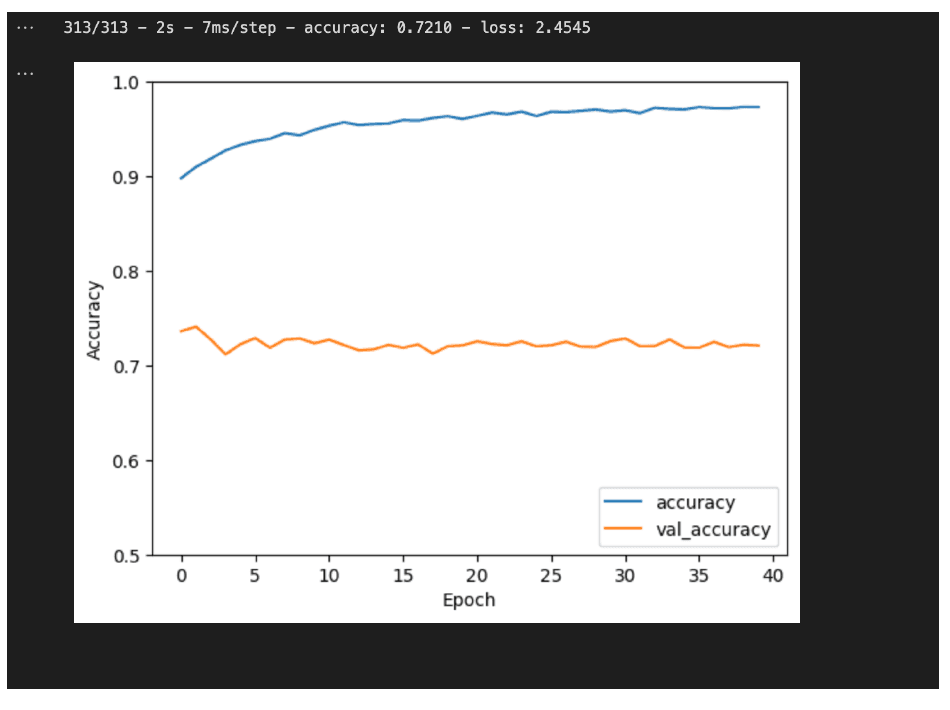
SIDE OBSERVATION // EPOCH TUNING
Training beyond 10 epochs did not improve validation accuracy. The widening gap between training and validation performance indicated overfitting, while loss increased to 2.45.
04 // The Result
The best result came from changing the starting point.
After testing deeper architectures, regularisation and data augmentation, the strongest accuracy came from moving to a pre-trained MobileNetV2 model.
★ BEST RECORDED RESULT
76%
MobileNetV2 accuracy
0.74
loss
HIGHEST ACCURACY
76%
MobileNetV2
The pre-trained model produced the strongest accuracy across the experiment set.
LOWEST LOSS
0.71
Model 3 · 75% accuracy
The three-block network with 20% dropout produced the lowest recorded loss in the experiment set.
EXPERIMENT RESULTS
Model progression
// WHAT THE RESULT SHOWED
The experiments showed that more complexity did not automatically lead to better performance. Dropout produced a strong result, while L2 regularisation and augmentation performed less well. Transfer learning ultimately produced the highest accuracy.
05 // Data Source
Original dataset & provenance.
ORIGINAL DATASET
CIFAR-10
A benchmark image-classification dataset created by Alex Krizhevsky, containing 60,000 32×32 colour images across 10 classes.
Krizhevsky, A. (2009) · University of Toronto
VIEW DATASET ↗06 // Lab Notes
What the experiments actually taught me.
NOTE 01
More complexity did not guarantee improvement.
Increasing network depth produced incremental gains, but the results showed that adding more complexity alone was not enough to consistently improve performance.
NOTE 02
Regularisation behaved differently depending on the approach.
The 20% dropout experiment reached 75% accuracy and the lowest loss, while L2 regularisation reduced performance in this experiment.
NOTE 03
An expected technique can still produce an unexpected result.
Data augmentation initially caused the model to plateau at around 10% accuracy. Simplifying the architecture improved the result, but it still finished well below the other experiments.
NOTE 04
Computational limits shaped the experiment.
With CPU-only resources, the project had to balance experimentation, training time and model complexity rather than testing every possible architecture.
// NEXT EXPERIMENTS
A natural next step would be to explore longer MobileNetV2 training, learning-rate scheduling, more refined augmentation and alternative pre-trained architectures such as EfficientNet.
// FINAL LAB NOTE
The interesting part wasn't finding the winning model. It was finding out why the others behaved differently.
// MODEL COMPARISON
MACHINE LEARNING // MODEL COMPARISON
BREAST CANCER
MODEL LABComparing four classification approaches to see which model best fitted the dataset.
01 // The Data
Start with the dataset. Understand what needs cleaning.
The dataset contained 699 observations with 9 predictor features and a binary classification target. Before modelling, the missing values had to be handled so the models could be compared consistently.
OBSERVATIONS
699
FEATURES
9
CLASSES
2
MISSING VALUES
16
DATASET IMPACT
2.29%
MISSING FIELD
Bare nuclei
DATA CLEANING
The 16 incomplete records were removed using complete-case analysis.
02 // The Approach
Four models. One dataset. A direct comparison.
DATA→CLEAN→SPLIT→TRAIN→COMPARE
MODEL 01
KNN
A distance-based classifier used as a direct benchmark against the other approaches.
MODEL 02
DECISION TREE
A rule-based model that makes predictions by splitting the feature space into decision paths.
MODEL 03
NAIVE BAYES
A probabilistic classifier providing a different modelling assumption from the distance- and tree-based approaches.
MODEL 04
NEURAL NETWORK
A feed-forward neural model used to test a more flexible non-linear approach.
03 // Data Preparation
Clean the data before comparing the models.
01
16 missing values
Missing entries were identified in the Bare nuclei field.
02
Complete-case analysis
Incomplete observations were removed before model training.
03
Confusion matrix evaluation
Performance was assessed using accuracy, sensitivity and specificity rather than accuracy alone.
04 // Model Comparison
The simplest model produced the strongest result.
★ BEST RESULT
KNN
The strongest overall classification result in the comparison.
98.25%
accuracy
sensitivity
1.00
specificity
0.95
DECISION TREE
91.20%
accuracy
sensitivity
0.91
specificity
0.90
NAIVE BAYES
97.07%
accuracy
sensitivity
0.91
specificity
1.00
NEURAL NETWORK
96.09%
accuracy
sensitivity
0.90
specificity
1.00
// WHAT THE COMPARISON SHOWED
KNN achieved 98.25% accuracy, with 1.00 sensitivity and 0.95 specificity. In the evaluated data, this meant the model correctly identified all malignant cases while correctly classifying 95% of benign cases.
// Why these metrics matter
Accuracy tells only part of the story.
In a medical classification problem, overall accuracy is useful, but it does not show what kinds of predictions the model gets wrong. Sensitivity and specificity provide additional context by showing how well the model identifies malignant and benign cases respectively.
ACCURACY
Overall correctness
The proportion of predictions the model classified correctly overall.
SENSITIVITY
Detecting malignant cases
Shows how effectively the model identifies cases that are actually malignant. Higher sensitivity means fewer malignant cases are missed.
SPECIFICITY
Identifying benign cases
Shows how effectively the model identifies cases that are actually benign. Higher specificity means fewer benign cases are incorrectly classified as malignant.
KEY TAKEAWAY
A high accuracy score alone does not guarantee a useful classifier. Looking at sensitivity and specificity helps reveal how the model behaves across both classes.
05 // Data Source
Original dataset & provenance.
ORIGINAL DATASET
Breast Cancer Wisconsin (Original)
A structured classification dataset containing measurements of cell characteristics used to distinguish benign and malignant cases.
Wolberg, W. (1990) · UCI Machine Learning Repository
VIEW DATASET ↗06 // What I Learned
The model comparison was also a lesson in evaluation.
NOTE 01
Data preparation matters.
Cleaning the missing values was an essential step before making meaningful model comparisons.
NOTE 02
Simple can work.
The strongest result came from KNN rather than the more complex neural network approach.
NOTE 03
One metric is not enough.
Accuracy gave a useful headline result, but sensitivity and specificity were important for understanding how the models performed across malignant and benign cases.
NOTE 04
Validation could go further.
Resampling, cross-validation and additional modelling approaches would provide greater confidence in the result.
// FINAL REFLECTION
The strongest result wasn't necessarily the most complicated model. It was the model that fitted this dataset best.
// SOFTWARE ENGINEERING
PHP // MYSQL // JAVASCRIPT // 2025
WearView Academy
IT SUPPORT SYSTEMA PHP/MySQL support management system designed to handle staff IT requests from issue submission through technician resolution.
01 // The System
A simple workflow with a clear operational path.
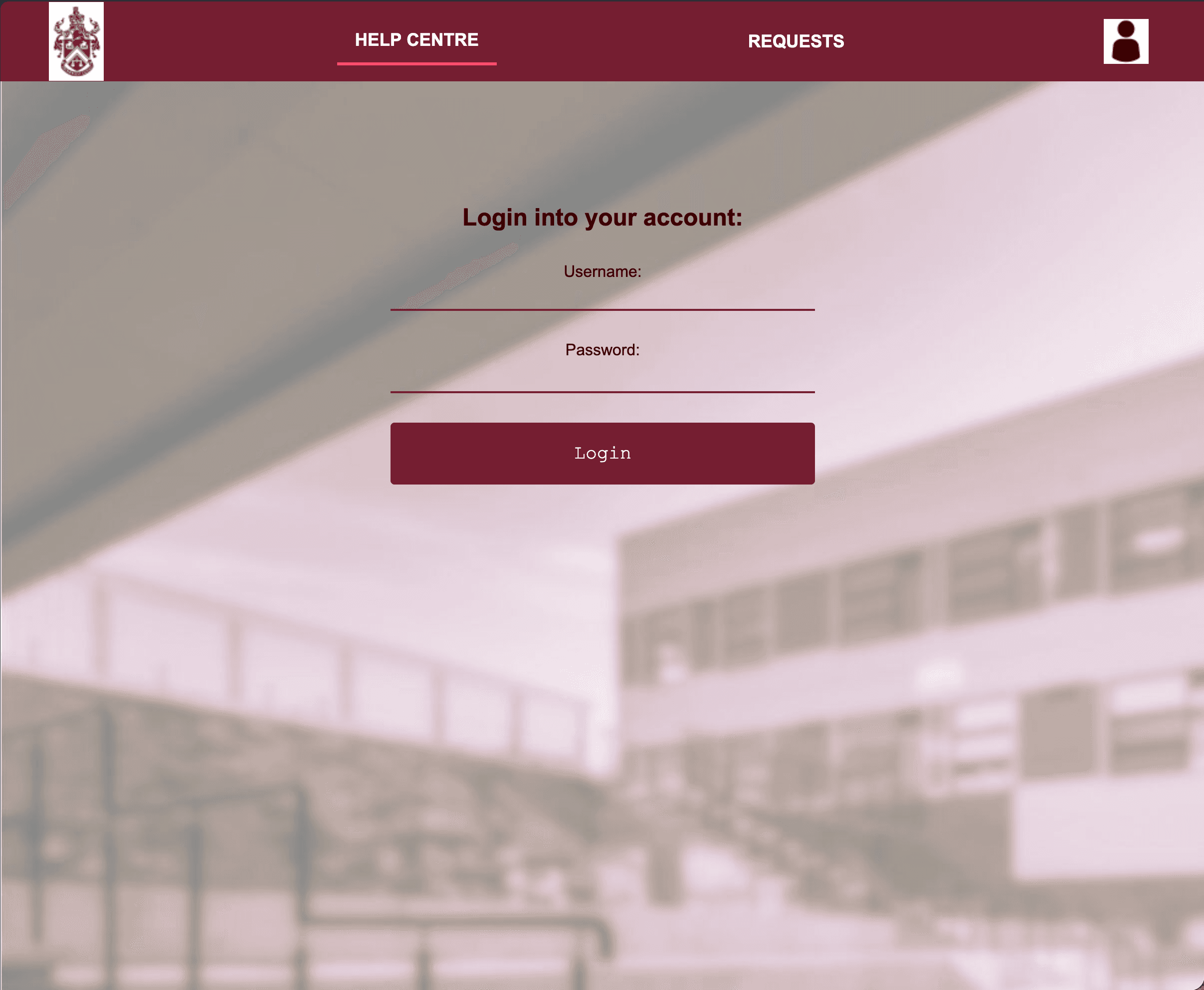
AUTHENTICATED ACCESS
Staff and technician entry point
01
LOGIN
→
02
REPORT
→
03
TRACK
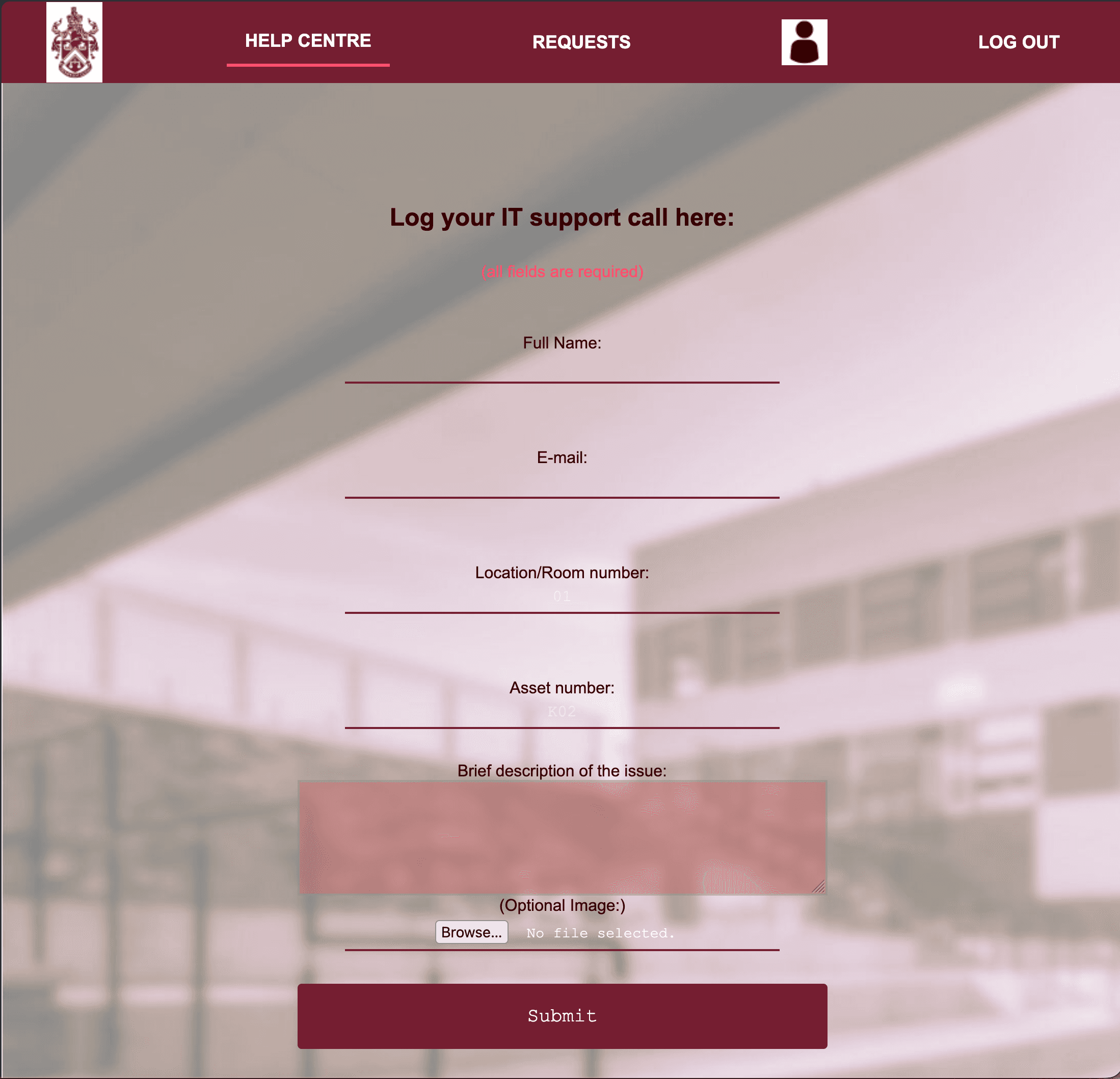
STAFF ISSUE LOG
Details + optional evidence

TECHNICIAN DASHBOARD
Separate active and completed work
STAFF WORKFLOW
Log an issue
Staff enter their details, location, asset number and issue description, with an optional file upload for supporting evidence.
TECHNICIAN WORKFLOW
Manage jobs
Jobs are separated into incomplete and complete views, with status updates written back to the database.
02 // Building It
A small full-stack workflow built around a relational database.
SERVER
PHP
Handles form processing, authentication flow, validation and database operations.
DATABASE
MySQL + PDO
Stores submitted IT issues and supports retrieval and status updates through PDO.
VALIDATION
Client + Server
JavaScript provides immediate feedback while server-side validation remains the control layer for submitted data.
INTERFACE
Responsive CSS
Flexible layouts and mobile/tablet media queries were used to adapt the prototype to different screen sizes.
03 // Security & Validation
Security and validation were important parts of the development process, so the system was tested against invalid input and common web vulnerabilities.
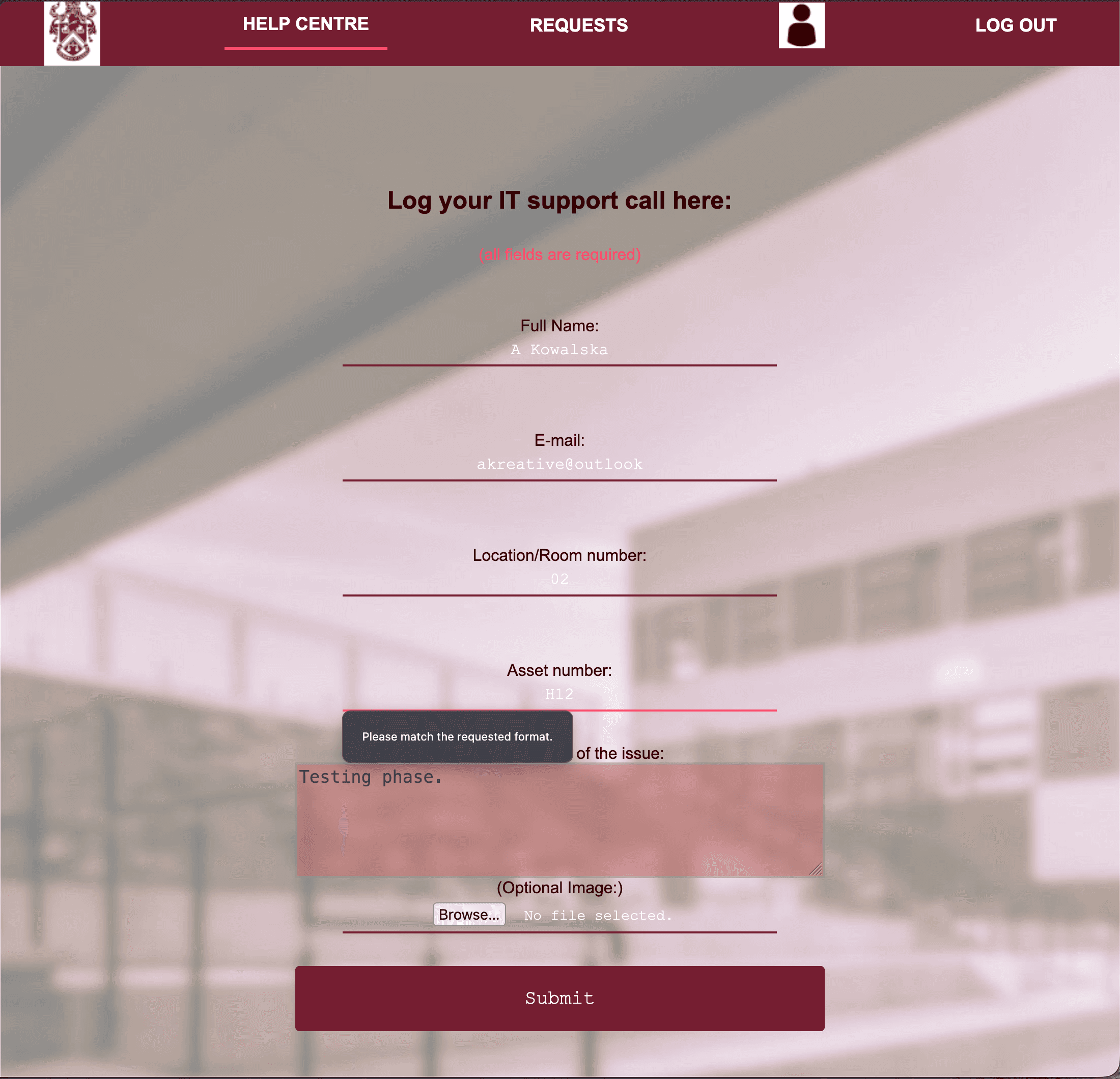
VALIDATION IN ACTION
Input rejected before submission
ACCESS
Server-side login validation
The prototype restricted access to staff or technician accounts through server-side validation.
INPUT
Sanitisation + validation
Input was validated on the server and sanitised, with JavaScript used to improve feedback and user experience.
TEST RESULT
No SQL injection found
Security testing identified no SQL injection vulnerability, while also exposing further session and header hardening opportunities.
// CRITICAL EVALUATION
The prototype was not treated as production-ready. Testing highlighted remaining issues around the session cookie and missing security headers such as CSP and HSTS, giving a clear direction for future hardening.
04 // UX & Testing
Build it. Test it. Find the gaps.
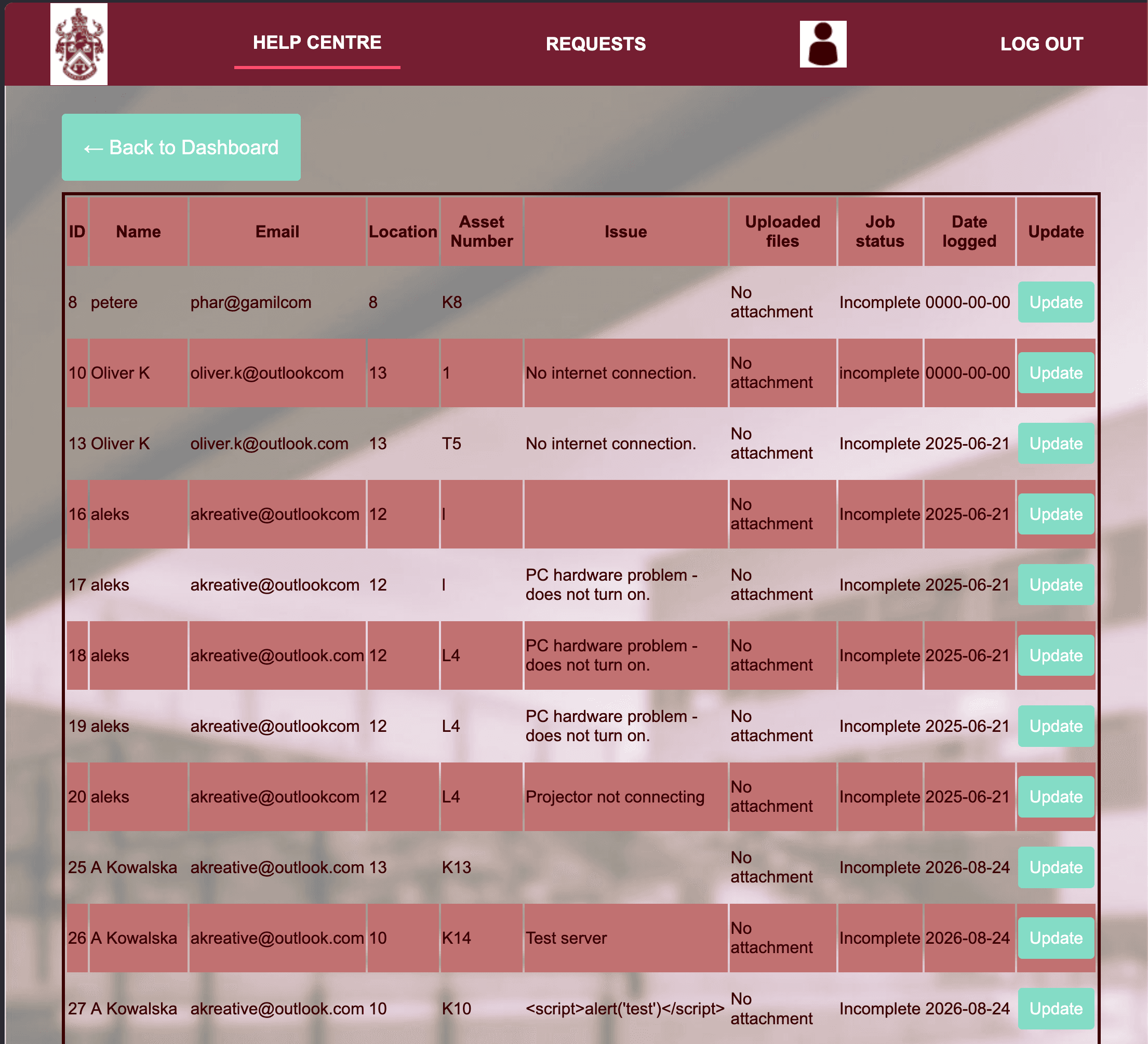
ACTIVE JOB QUEUE
Technician-facing workflow
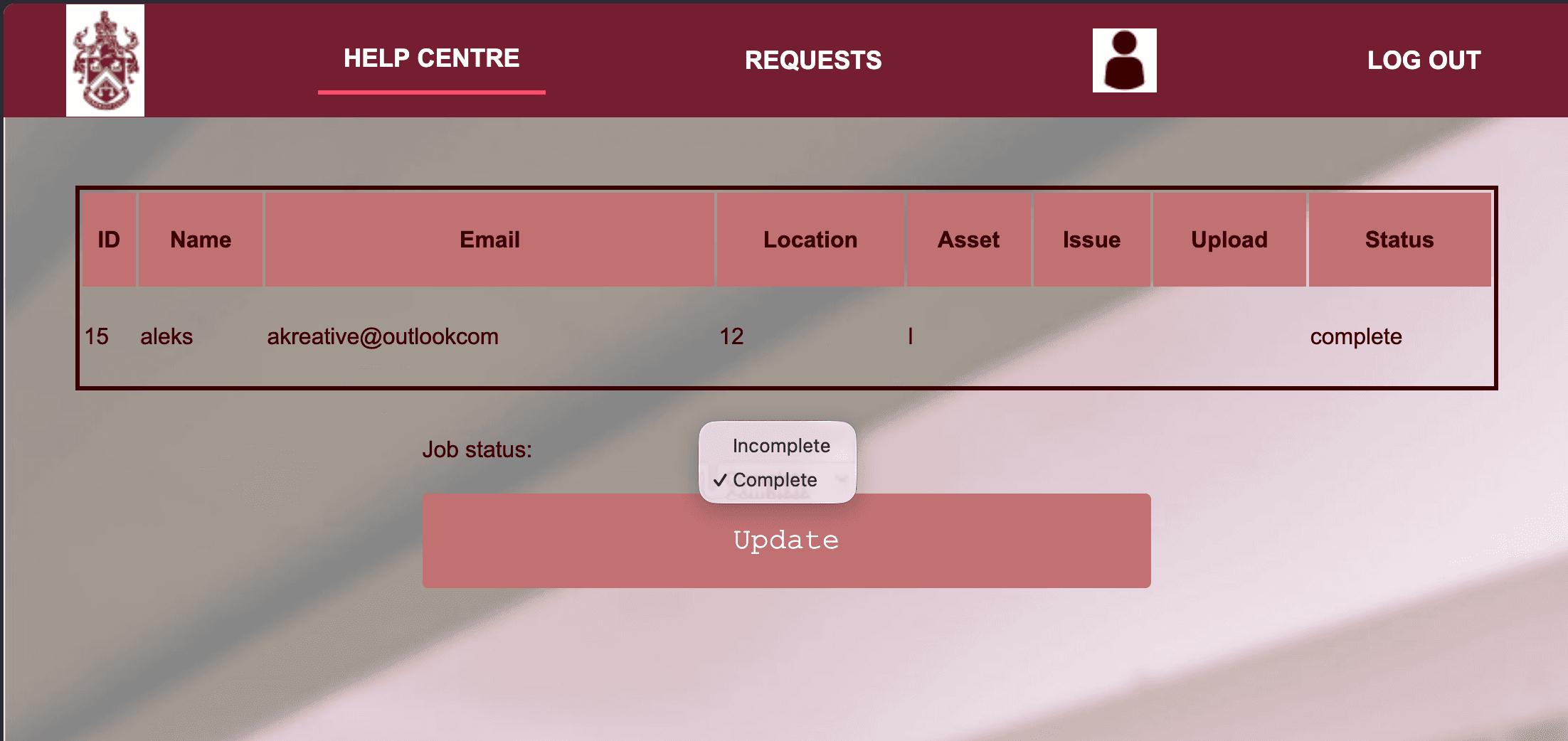
STATUS UPDATE
Complete the workflow
3
Users observed
UX
Flow tested
RWD
Responsive test
WHAT WORKED
Users found the flow logical and easy to follow, while login and issue submission worked correctly during observation.
WHAT NEEDED WORK
Testing highlighted contrast, navigation and smaller-screen job-list improvements as areas for further development.
05 // What I Learned
01
Validation has layers.
Client-side checks can improve the experience, but they should not replace server-side validation.
02
Testing changes the build.
User observation and security testing exposed issues that would not be obvious from the happy path alone.
03
Prototype ≠ production.
A working prototype can still reveal clear next steps for stronger authentication, session security and accessibility.
// FINAL ENGINEERING NOTE
The most useful part of the build was discovering where a working system still needed to become a better one.
// ARTIFICIAL NEURAL NETWORK
MACHINE LEARNING // BINARY CLASSIFICATION // 2025
BANK MARKETING
ANN LABExploring how class imbalance, oversampling and neural network architecture influence binary classification performance.
01 // The Problem
Start with the data imbalance.
The project used the Bank Marketing dataset as a binary classification problem. A key focus was understanding how class imbalance could affect model behaviour and how oversampling could be used to address it.
TASK
BINARY
CLASSIFICATION
CHALLENGE
IMBALANCE
CLASS DISTRIBUTION
MODEL
ANN
NEURAL NETWORK
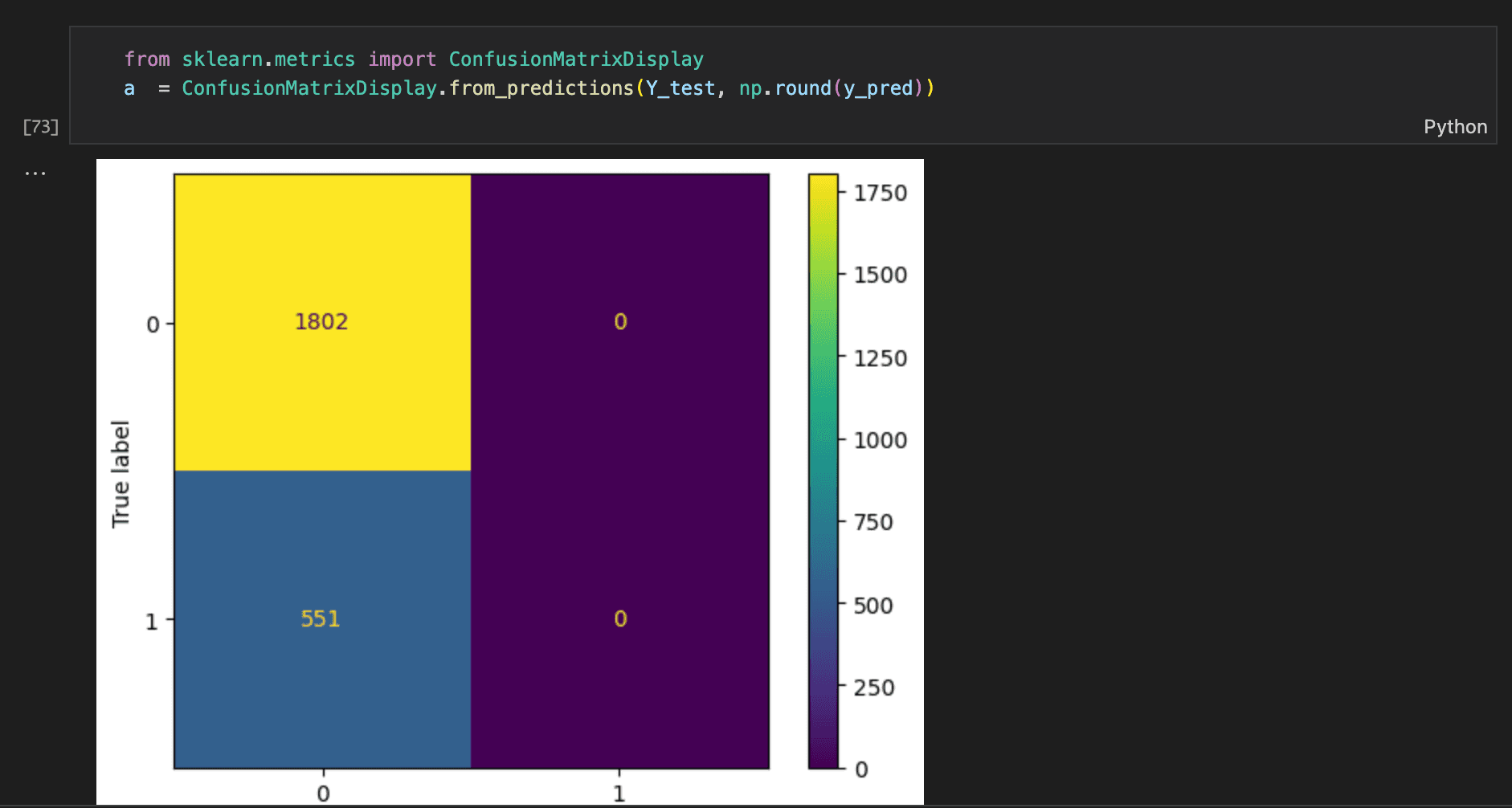
BASELINE // CLASS IMBALANCE
The initial model predicted only the negative class, exposing the impact of the 77:23 class imbalance.
02 // The Approach
Experiment with the data before changing the model.
STEP 01
Inspect
Examine the structure of the classification problem and the distribution of the target classes.
STEP 02
Prepare
Prepare the dataset for neural network modelling and account for the imbalance problem.
STEP 03
Oversample
Explore oversampling as a way of giving the minority class greater representation during training.
STEP 04
Compare
Compare network configurations and examine how architecture changes affect the classifier.
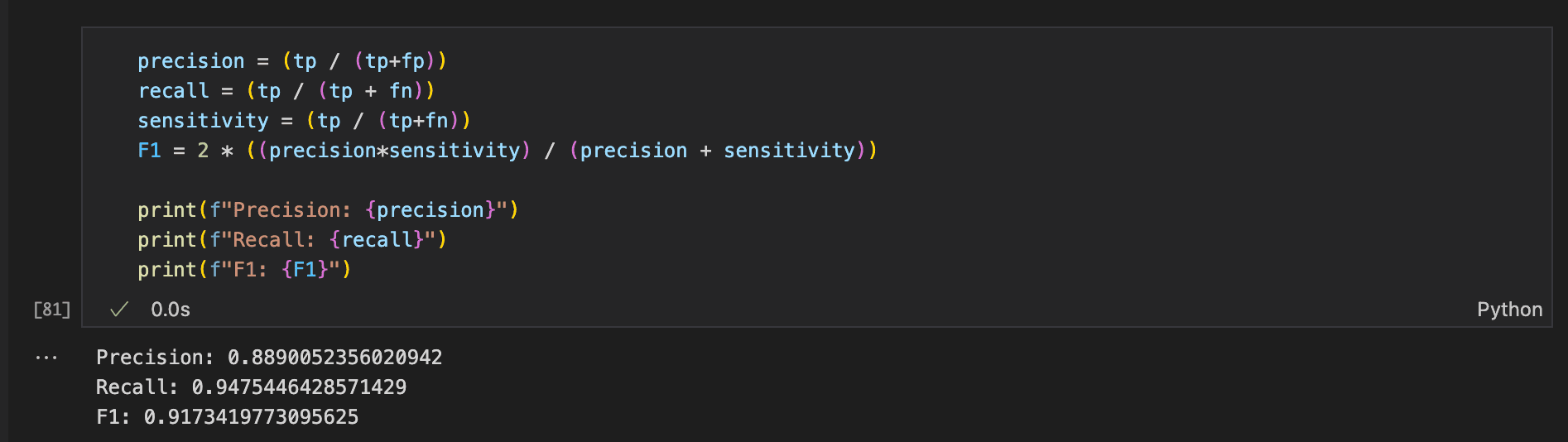
OVERSAMPLING // TRAINING DATA
RandomOverSampler was used to rebalance the minority class without discarding existing observations.
03 // Network Architecture
A deliberately compact neural network.
01BASELINE
One hidden layer · 6 nodes
TEST ACCURACY // 77%
02BEST MODEL
One hidden layer · 12 nodes
TEST ACCURACY // 98%
03COMPLEXITY TEST
One hidden layer · 24 nodes
TEST ACCURACY // 93%
04DEPTH TEST
Two hidden layers · 6 nodes each
TRAINING ACCURACY // 90%
WINNER
12 HIDDEN NODES
Increasing the hidden layer from 6 to 12 nodes produced the strongest configuration, reaching 98% test accuracy.
ARCHITECTURE SNAPSHOT
MODEL
ANN
HIDDEN NODES
12
FOCUS
BINARY
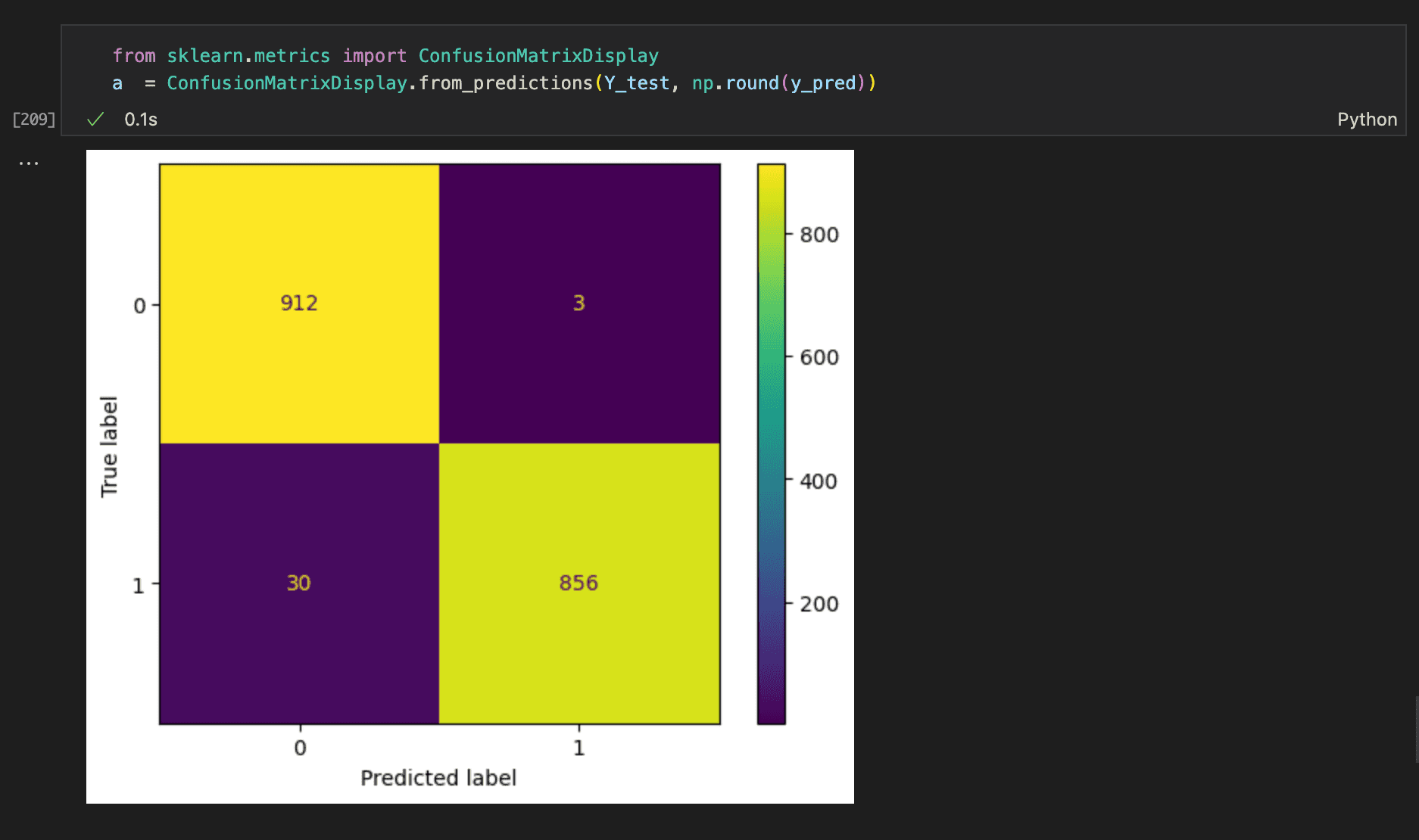

HOW TO READ THE MATRIX
Each cell shows how the model's predictions compared with the actual class. The diagonal shows correct predictions; the off-diagonal cells show errors.
912
TRUE NEGATIVES
TRUE NEGATIVES
3
FALSE POSITIVES
FALSE POSITIVES
30
FALSE NEGATIVES
FALSE NEGATIVES
856
TRUE POSITIVES
TRUE POSITIVES
For this model, 912 class-0 cases and 856 class-1 cases were correctly classified, while 3 class-0 cases were predicted as class 1 and 30 class-1 cases were predicted as class 0.
04 // What the Experiment Showed
The model was only one part of the problem.
DATA
Class distribution matters.
An imbalanced dataset can make overall performance look better than the model's behaviour on the minority class.
RESAMPLING
Oversampling changes what the network sees.
Rebalancing the training data can change how effectively the classifier learns the minority class.
ARCHITECTURE
More complexity is not automatically better.
Network structure, hidden-layer size and data preparation all influence model behaviour, so the architecture has to fit the problem rather than simply become larger.
06 // Data Source
Original dataset & provenance.
ORIGINAL DATASET
Bank Marketing
Originally published through the UCI Machine Learning Repository, the dataset contains data from direct telephone marketing campaigns conducted by a Portuguese banking institution.
Moro, S., Rita, P. & Cortez, P. (2014)
VIEW DATASET ↗07 // What I Learned
01
Data preparation is part of modelling.
The classifier cannot be evaluated separately from the data it was trained on.
02
Imbalance needs attention.
Looking beyond overall accuracy is important when one class is represented differently from the other.
// FINAL LAB NOTE
The interesting part wasn't just building the neural network. It was understanding how the data shaped what the network learned.
// PYTHON QUIZ
PYTHON // MINI PROJECT // 2025
QUIZ
T / FA command-line true-or-false quiz exploring Python dictionaries, functions, input validation and score tracking.
01 // The Idea
Keep the interaction simple.
The project is a 10-question true-or-false quiz. Players enter their name, answer each question and receive a final score and percentage.
QUESTIONS
10
TRUE / FALSE
INPUT
T / F
VALIDATED
PLAYERS
MULTI
SCORE TRACKING
02 // The Structure
Separate the data from the quiz logic.
The questions are stored in a separate Python dictionary, allowing the main quiz program to import and work with the question data independently.
QUESTION DATA // PYTHON DICTIONARY
quiz = {
1 : {"question" : "An octopus has three hearts...",
"answer" : "t"
},
2 : {"question" : "Goldfish have a two second memory...",
"answer" : "f"
}
}
03 // Input Validation
Make user input predictable.
The answer-checking function validates the player's response and accepts both uppercase and lowercase T/F input.
INPUT VALIDATION // USER RESPONSE
answers = ['t', 'f', 'T', 'F']
while user_answer not in answers:
user_answer = input(...)
if quiz[question]['answer'].lower()
== user_answer.lower():
04 // Score System
Turn correct answers into a result.
Each correct answer increments the score, which is then converted into a percentage based on the total number of questions.
SCORING // PERCENTAGE CALCULATION
nr_quiz_questions = 10
def percentage_score(score, nr_quiz_questions):
percent = (score / nr_quiz_questions) * 100
return percent
05 // What I Learned
Small project, useful fundamentals.
FUNCTIONS
Practised breaking the quiz into reusable pieces of logic.
VALIDATION
Built predictable handling for user input and case-sensitive responses.
// FINAL PROJECT NOTE
The project helped turn basic Python syntax into a complete interactive program with a clear beginning, middle and end.
// OBJECT-ORIENTED PYTHON
PYTHON // SOFTWARE PROJECT // 2025
LIBRARY CATALOGUE
OOP LABA Python-based library management system exploring object oriented programming, catalogue operations and book loans.
01 // The Model
Represent books as objects.
The system uses Python classes to represent the main parts of the library. Each Book object stores attributes such as title, author, publisher, year and number of copies.
OBJECT MODEL // BOOK CLASS
class Book():
def __init__(self, ID, title, author,
publisher, year, no_copies,
publication_year):
self.ID = uuid.uuid4()
self.title = title
self.author = author
self.no_copies = int(no_copies)
02 // Catalogue Operations
Search and manage the catalogue.
Books can be added, removed and searched by title, author, publisher and publication year.
SEARCH // TITLE LOOKUP
user_search = input('Please enter book title to search: ')
book_search = [book for book in self.book_list
if book.title.lower() == user_search.lower()]
03 // Loans
Track borrowed books and due dates.
The Loans class manages borrowed books, available books and due dates, storing each borrowing transaction against a user account.
BORROWING // USER ACCOUNT
self.due_date = datetime.now() + timedelta(days=30)
self.available_books = Book_list.available_books
borrowed_book = [{self.user_name:
[self.book_title, self.due_date]}]
self.user_account.extend(borrowed_book)
04 // What I Learned
Learning to model a real-world system.
OBJECT-ORIENTED DESIGN
Separate responsibilities.
Classes provided a way to represent books, users and loans as distinct parts of the system.
STATE MANAGEMENT
Keep track of changing data.
Borrowing and returning books required the system to keep track of availability and user loan information.
// FINAL PROJECT NOTE
A small Python system that introduced me to modelling real-world relationships through code.
VISUAL ARCHIVE // FEATURED BA PROJECT
BA GRAPHIC DESIGN // 2014
Portraits 2014
COMPETITION WINNERFEATURED PROJECTVISUAL IDENTITY
An exhibition identity exploring stereotyping, judgement and hidden identity through portraiture, colour, typography and a four-gallery visual system.
01 // CONCEPT
Identity, masks and the problem of judgement.
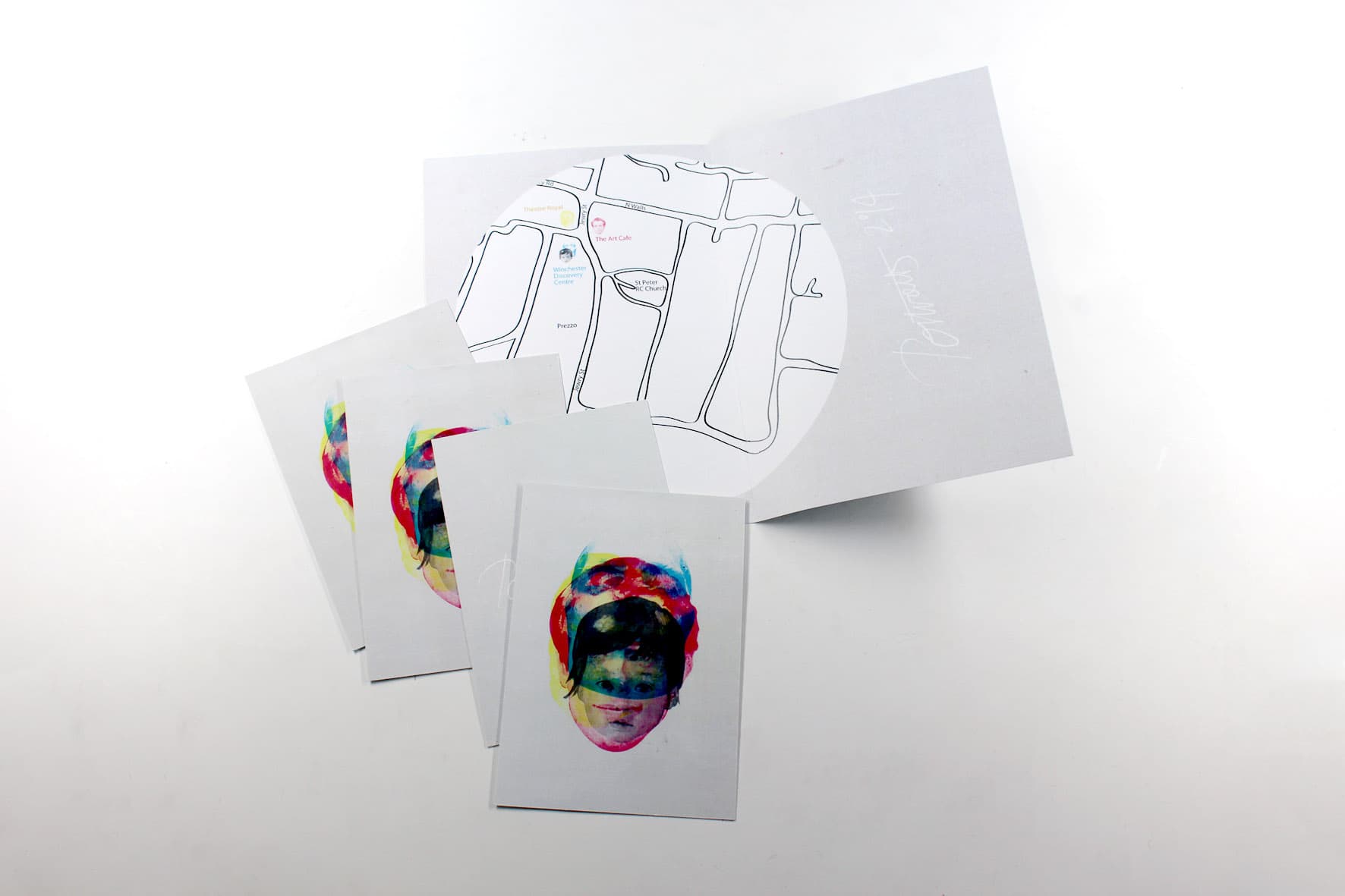
The project challenged ideas around stereotyping and judging. The mask became the central visual concept, representing the idea of an object that can hide a person's true identity.
CORE IDEA
What we see is not necessarily what we understand.
02 // VISUAL SYSTEM
One identity. Four gallery environments.
The visual system was developed for four neighbouring galleries, with each gallery presenting a different portrait theme. Colour was used to distinguish the venues while keeping the overall identity connected.
GALLERY 01
GALLERY 02
GALLERY 03
GALLERY 04
03 // PRIMARY ARTWORK
Layered portraiture.
PRIMARY POSTER // PORTRAITS 2014
04 // PHYSICAL OUTCOME
From visual identity to printed object.

05 // SELECTED MATERIAL
A closer look at the visual language.


ARCHIVE NOTE
An important early project in my visual practice, combining conceptual thinking, information structure, typography and physical production.
VISUAL ARCHIVE // BA GRAPHIC DESIGN
BA GRAPHIC DESIGN // 2014
Typography Specimen
TYPE STUDYEDITORIALDIGITAL + PRINT
An experimental typography project investigating how type changes through scale, spacing, weight, structure and composition across physical and digital formats.
HISTORICAL REFERENCE
The specimen format was inspired by early manuscript and book design, translating the visual language of handwritten manuscripts and early printed books into a contemporary typographic object.
01 // TYPE SYSTEM
Typography as a visual system.
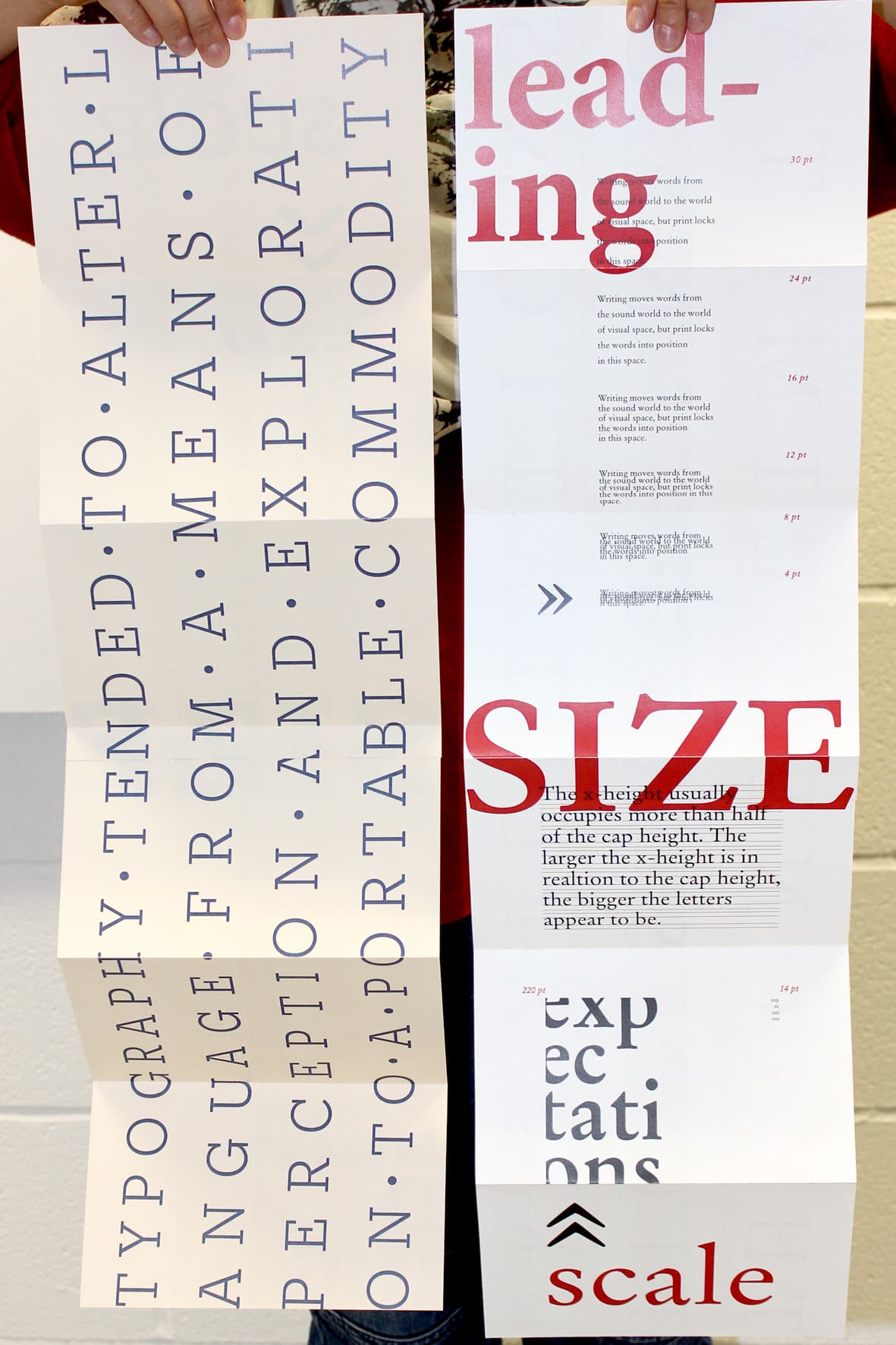
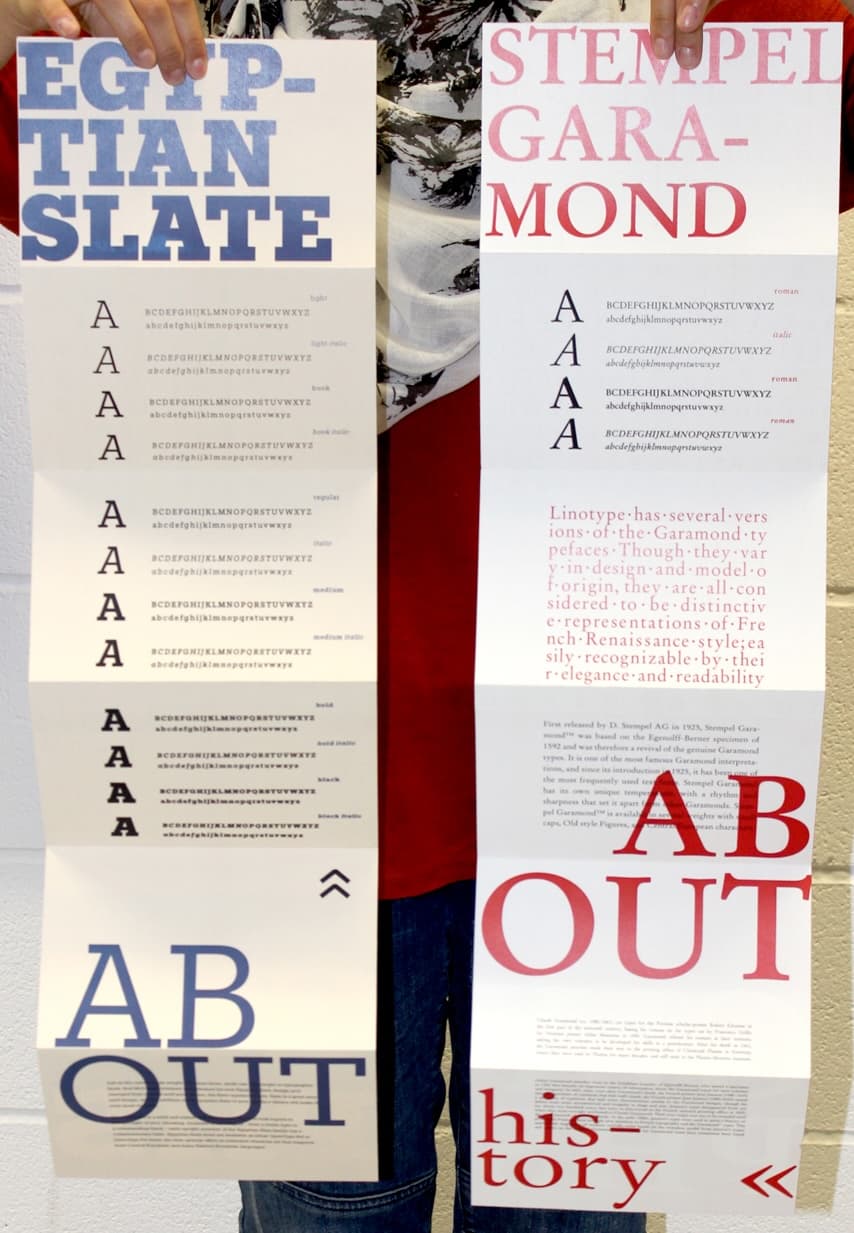
The specimen explores different weights, scales and typographic relationships, using large letterforms alongside detailed character and glyph studies.
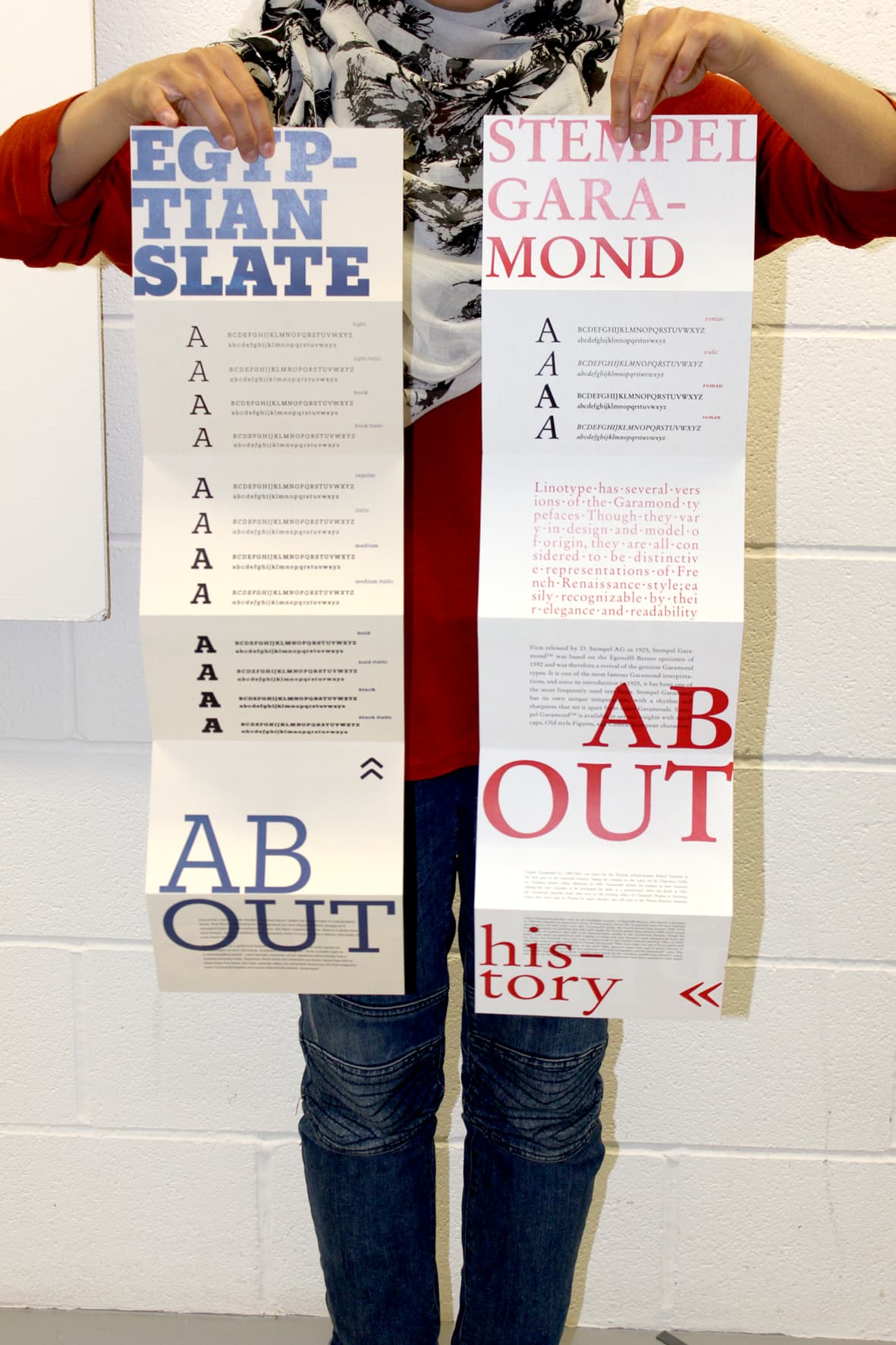
SPECIMEN // PRIMARY PAGE
02 // SCALE / SPACING
Exploring the behaviour of type.
Size, spacing and tracking become part of the composition, allowing typography to move between information, image and graphic form.
SIZEAa
SPACINGTYPE
WEIGHTGLYPH
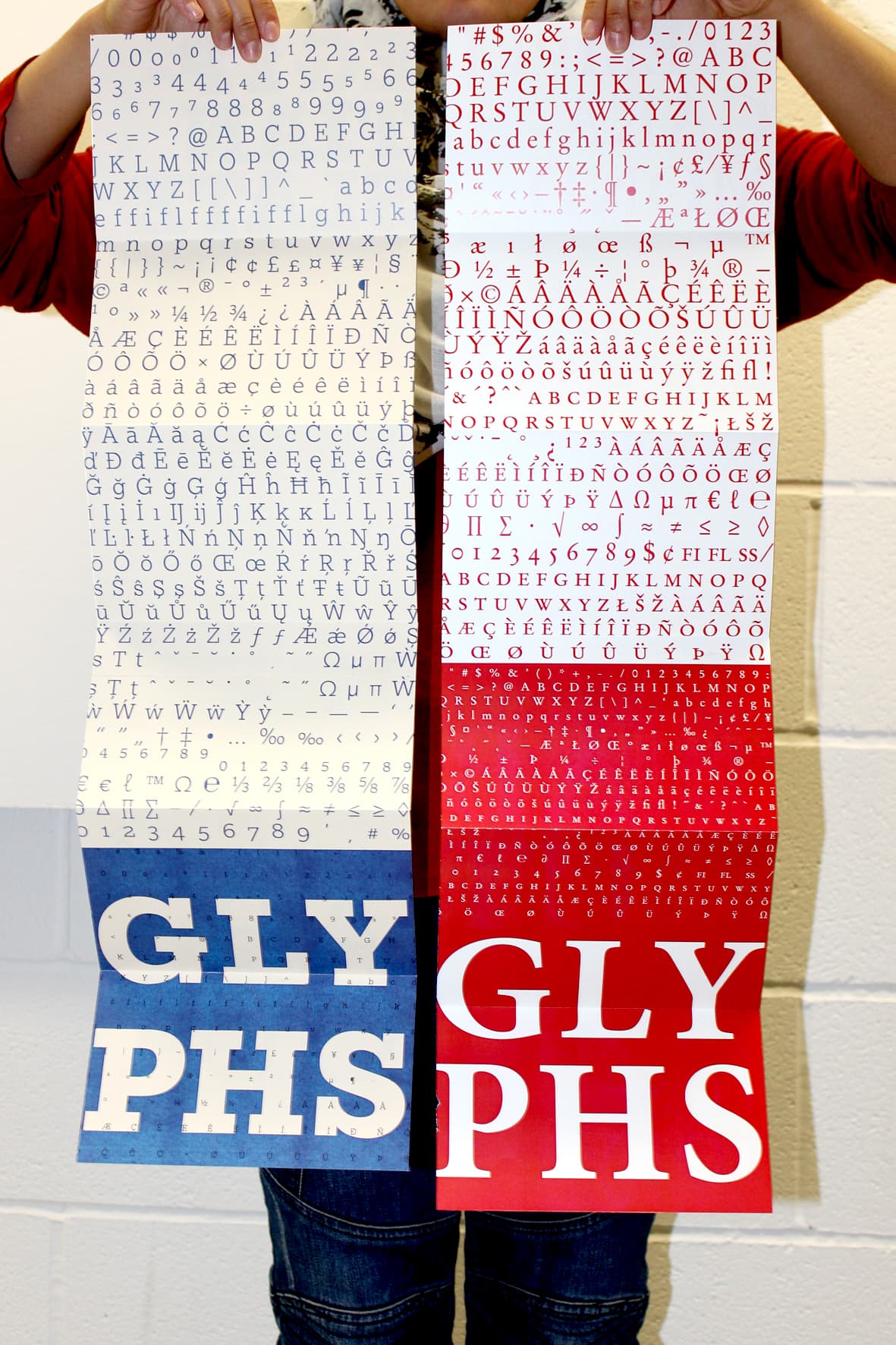
03 // GLYPH STUDIES
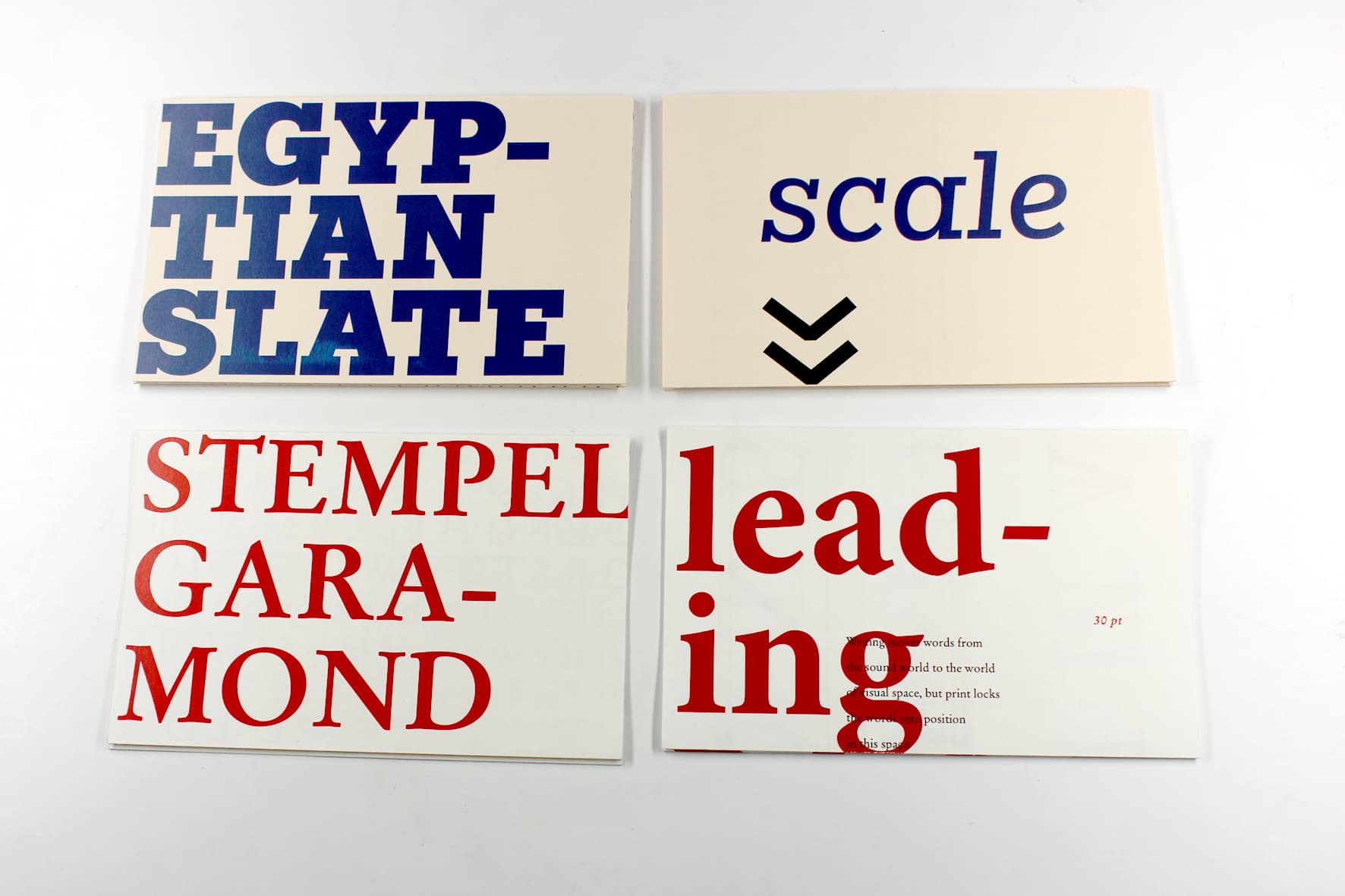
Detail at character level.

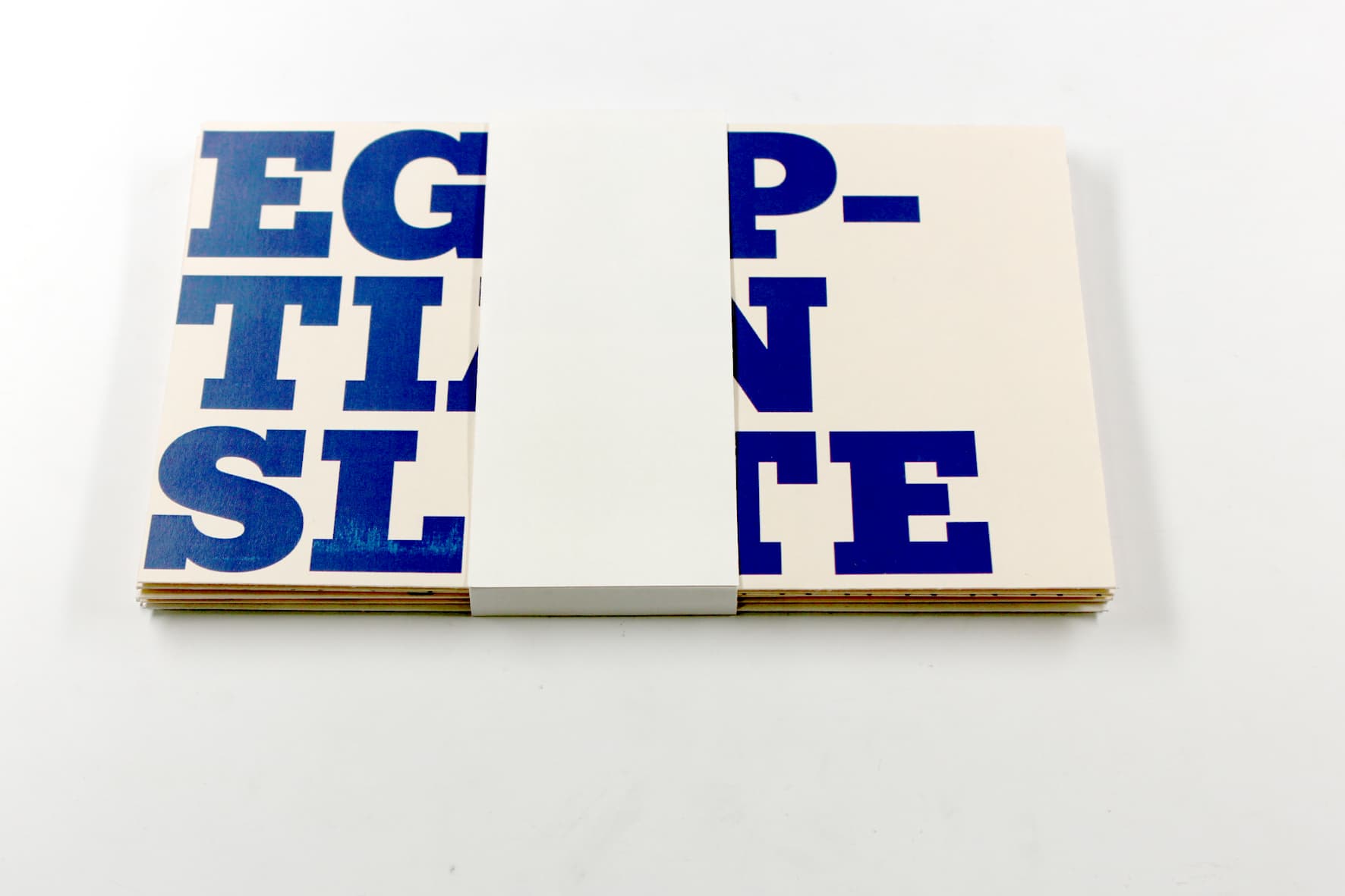
04 // PHYSICAL SPECIMEN
From printed page to physical object.

05 // DIGITAL SPECIMEN
Extending the specimen onto the web.
The project was also explored through a web-based specimen, translating the typographic system into a digital presentation rather than treating the printed work as a static outcome.
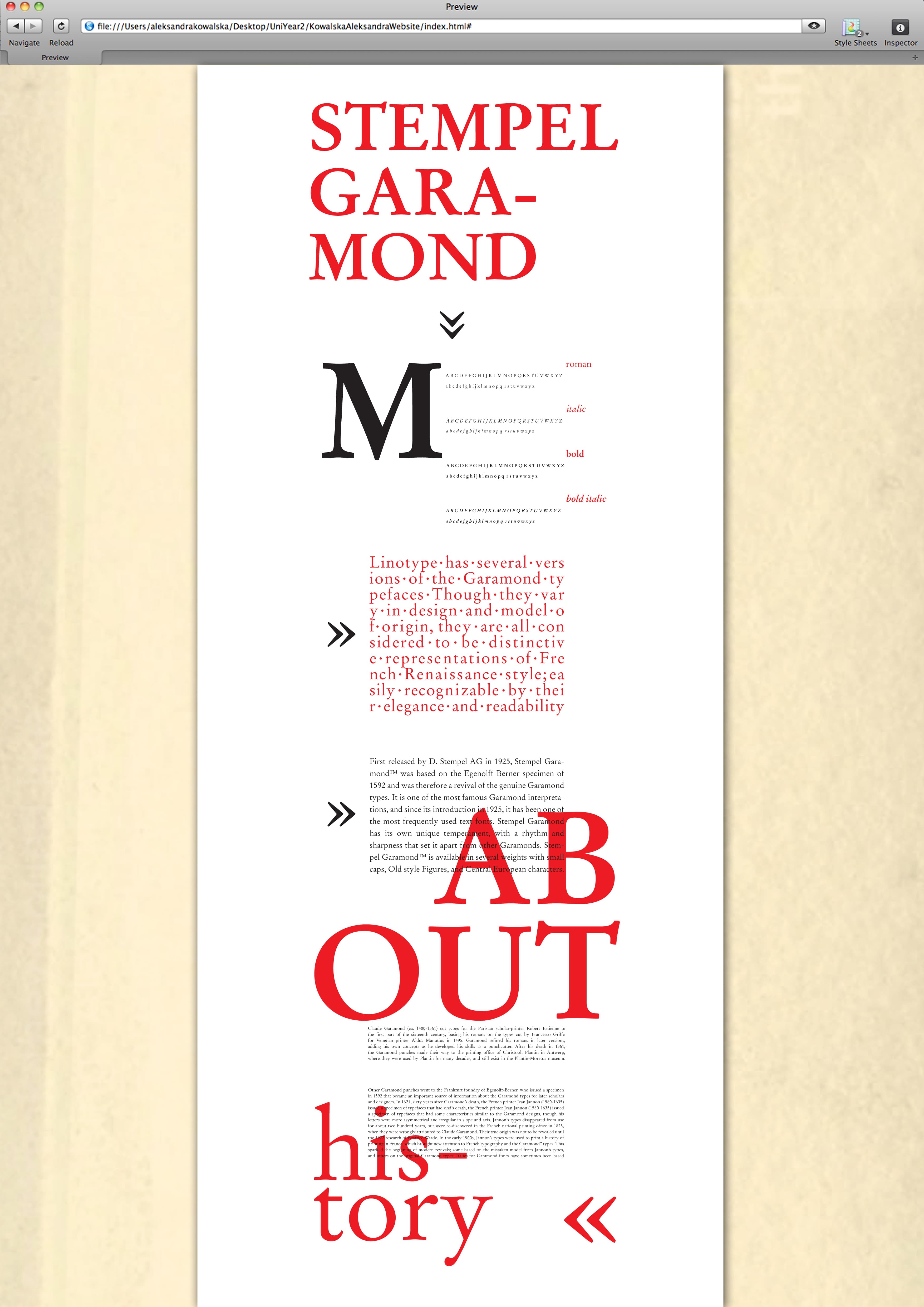
DIGITAL SPECIMEN // SCREEN 01
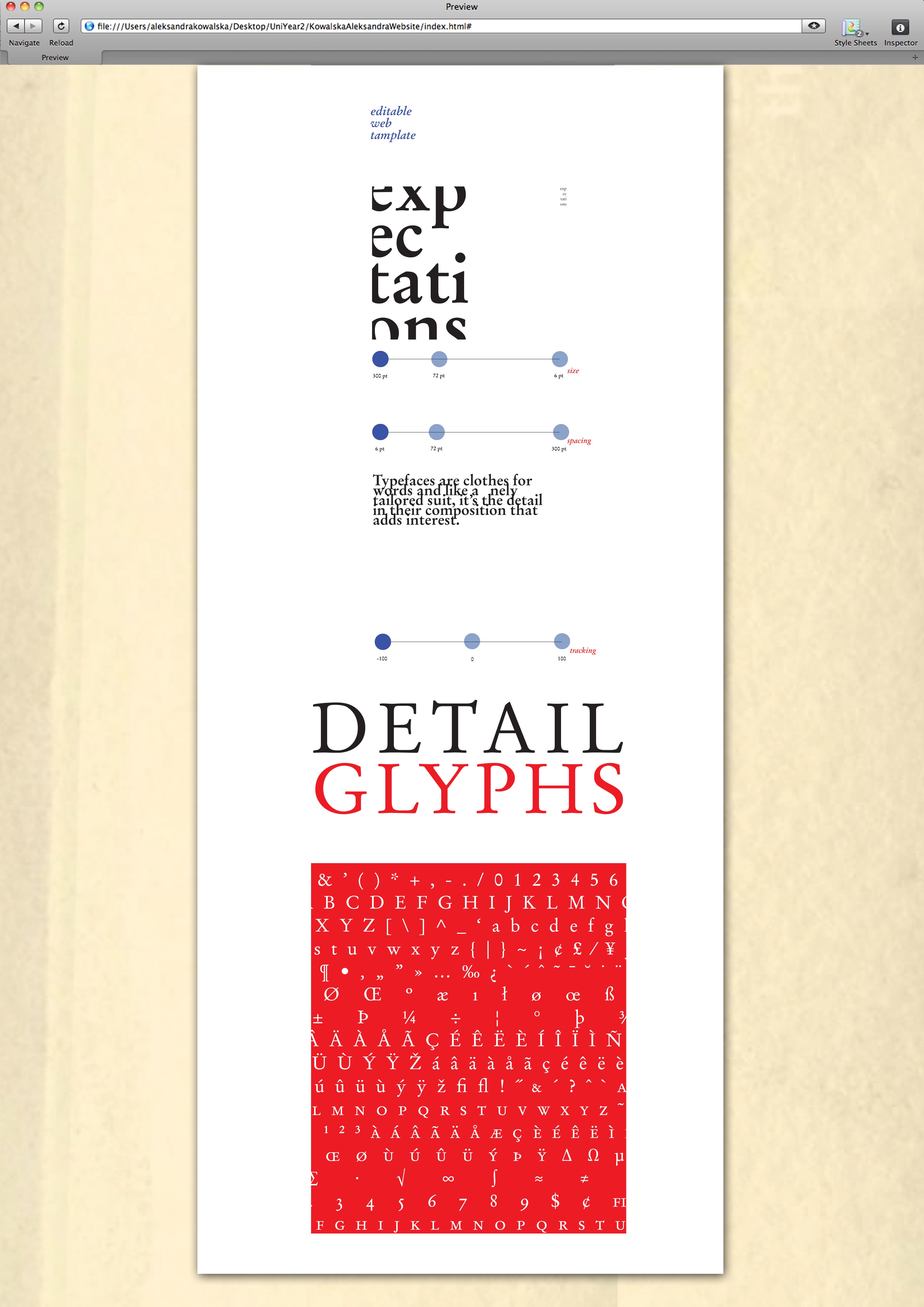
DIGITAL SPECIMEN // SCREEN 02
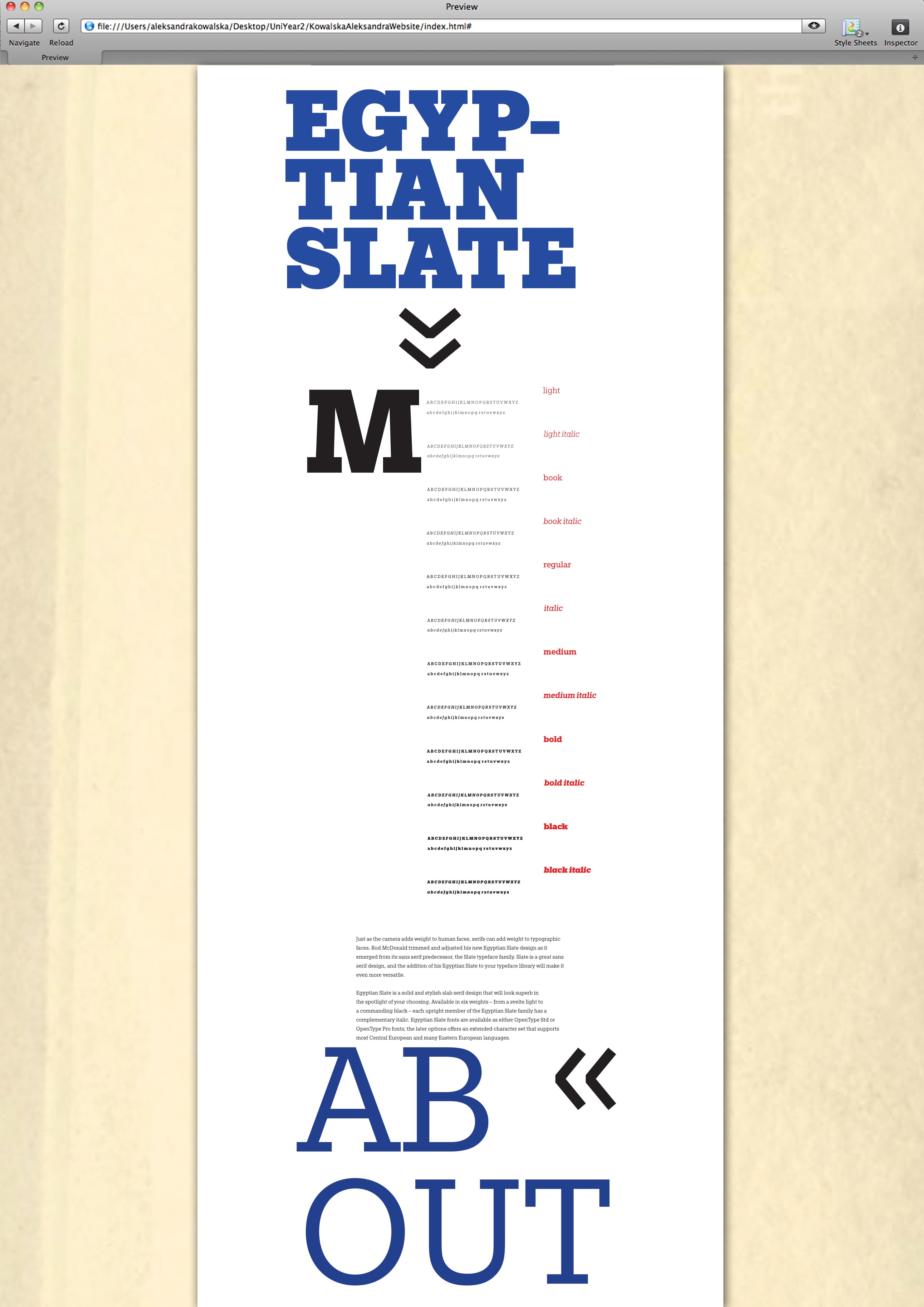
DIGITAL SPECIMEN // SCREEN 02
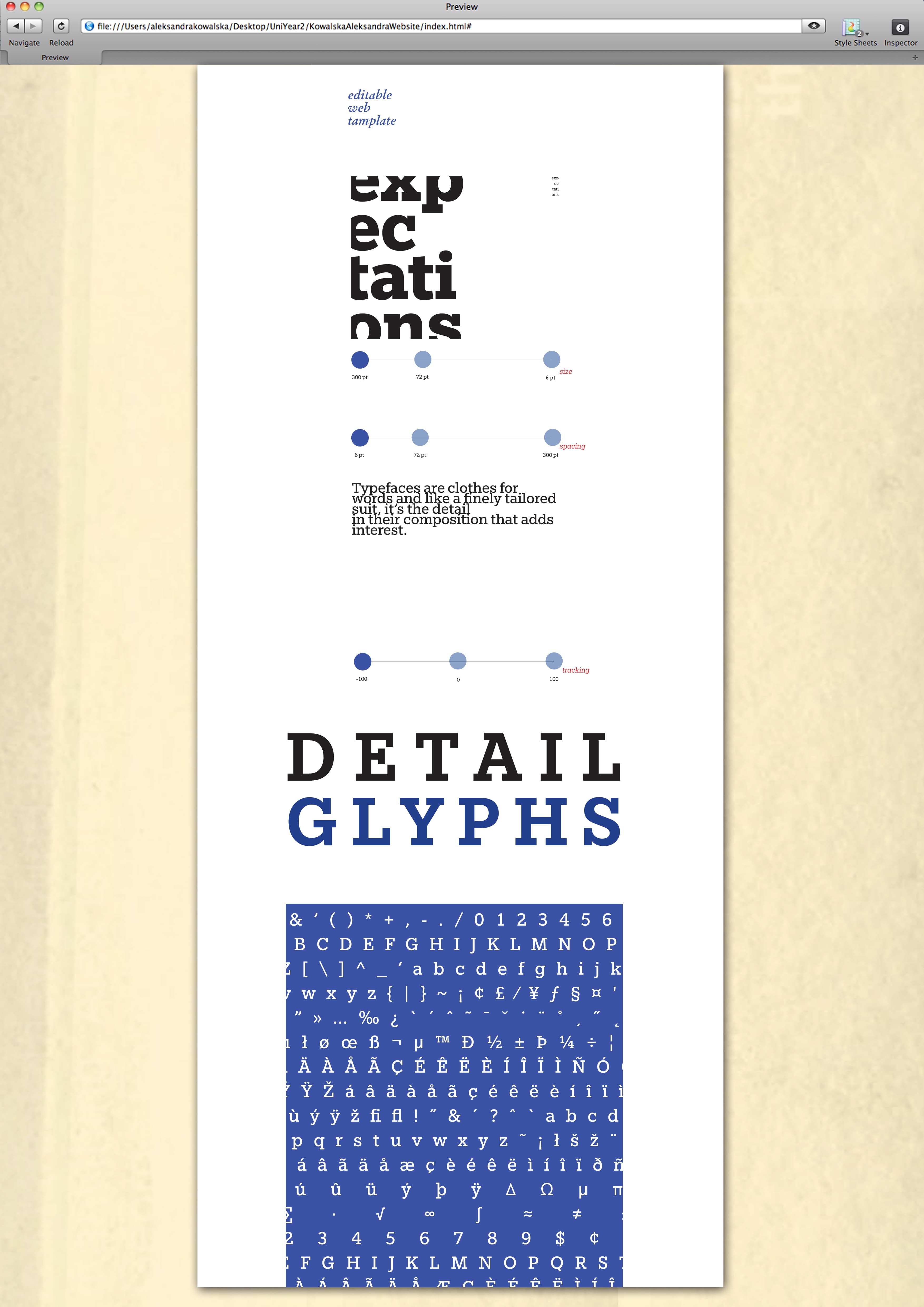
DIGITAL SPECIMEN // SCREEN 04
ARCHIVE NOTE
An exploration of typography as both information and visual material — moving between structured specimen pages, physical print and digital presentation.
VISUAL ARCHIVE // PERSONAL ETHOS
2014BA GRAPHIC DESIGNPERSONAL ETHOS
Manifesto
PERSONAL ETHOS // PRINT + EXPERIMENTATION
01 // THE BRIEF
The brief was to design an outcome that communicated personal beliefs and work ethic. The project became a visual exploration of the principles that informed my approach to design.
CORE ETHOS
TAKE RISKS
EXPERIMENT
MAKE MISTAKES
UTILISE MISTAKES
02 // THE ETHOS
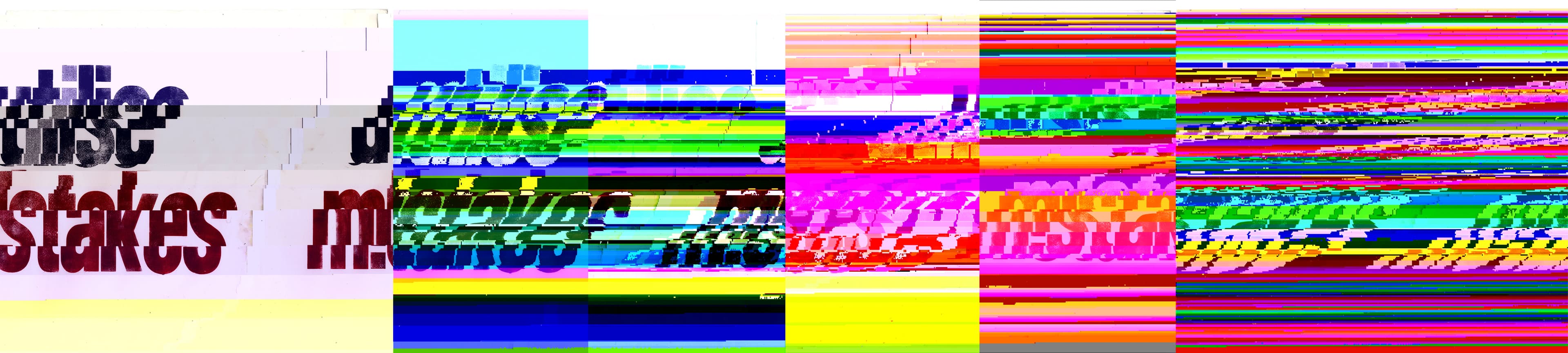
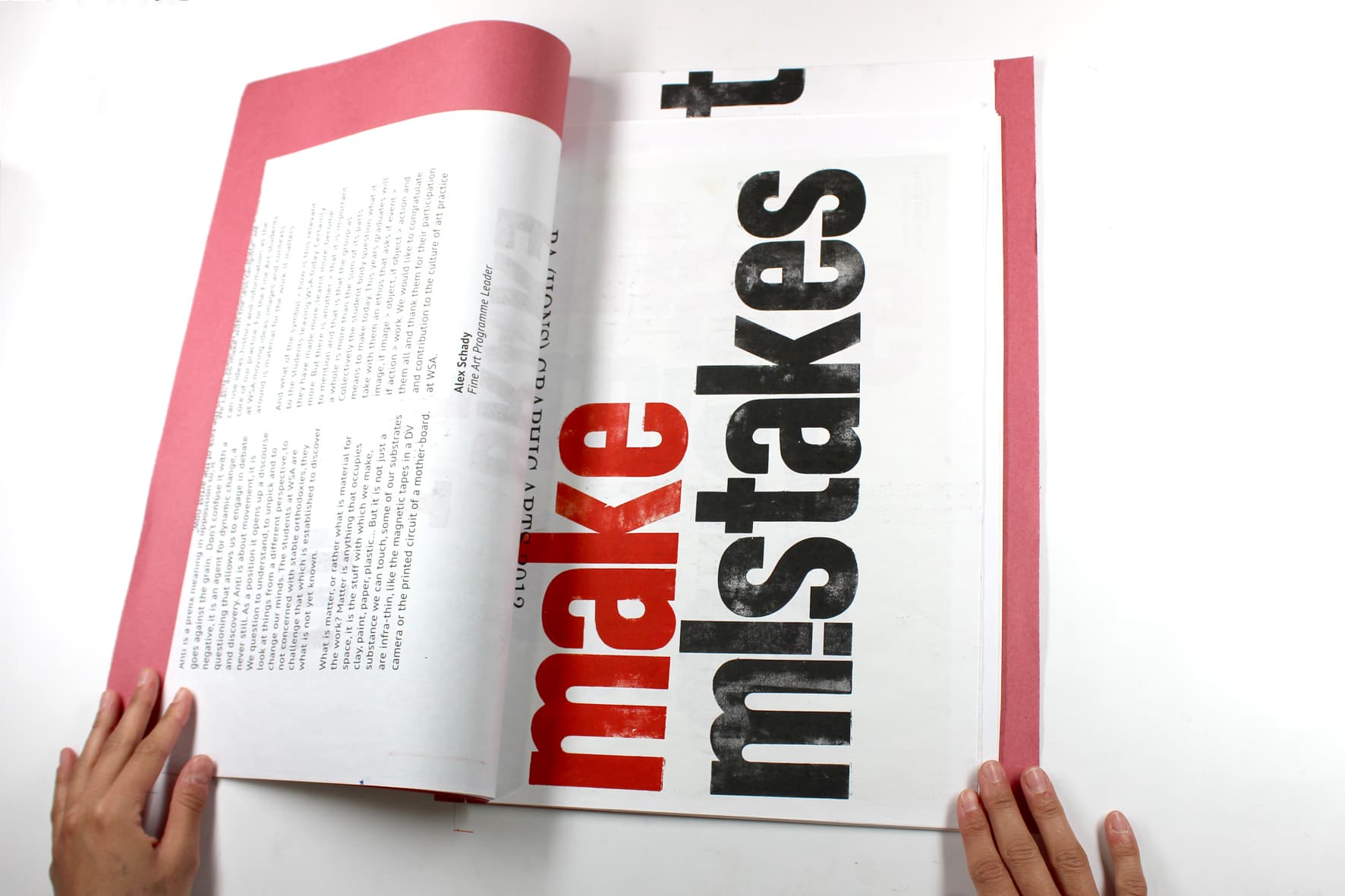
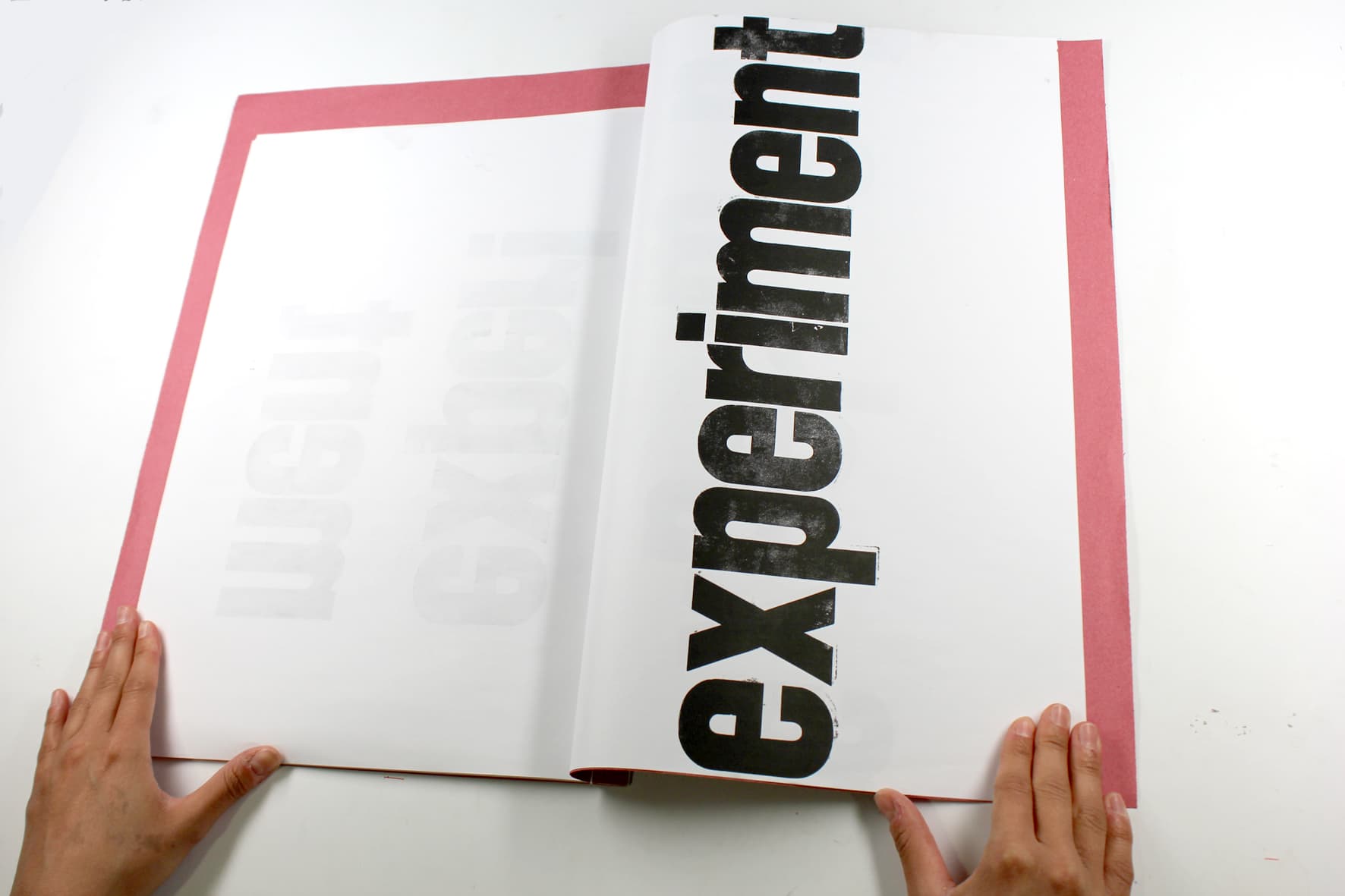
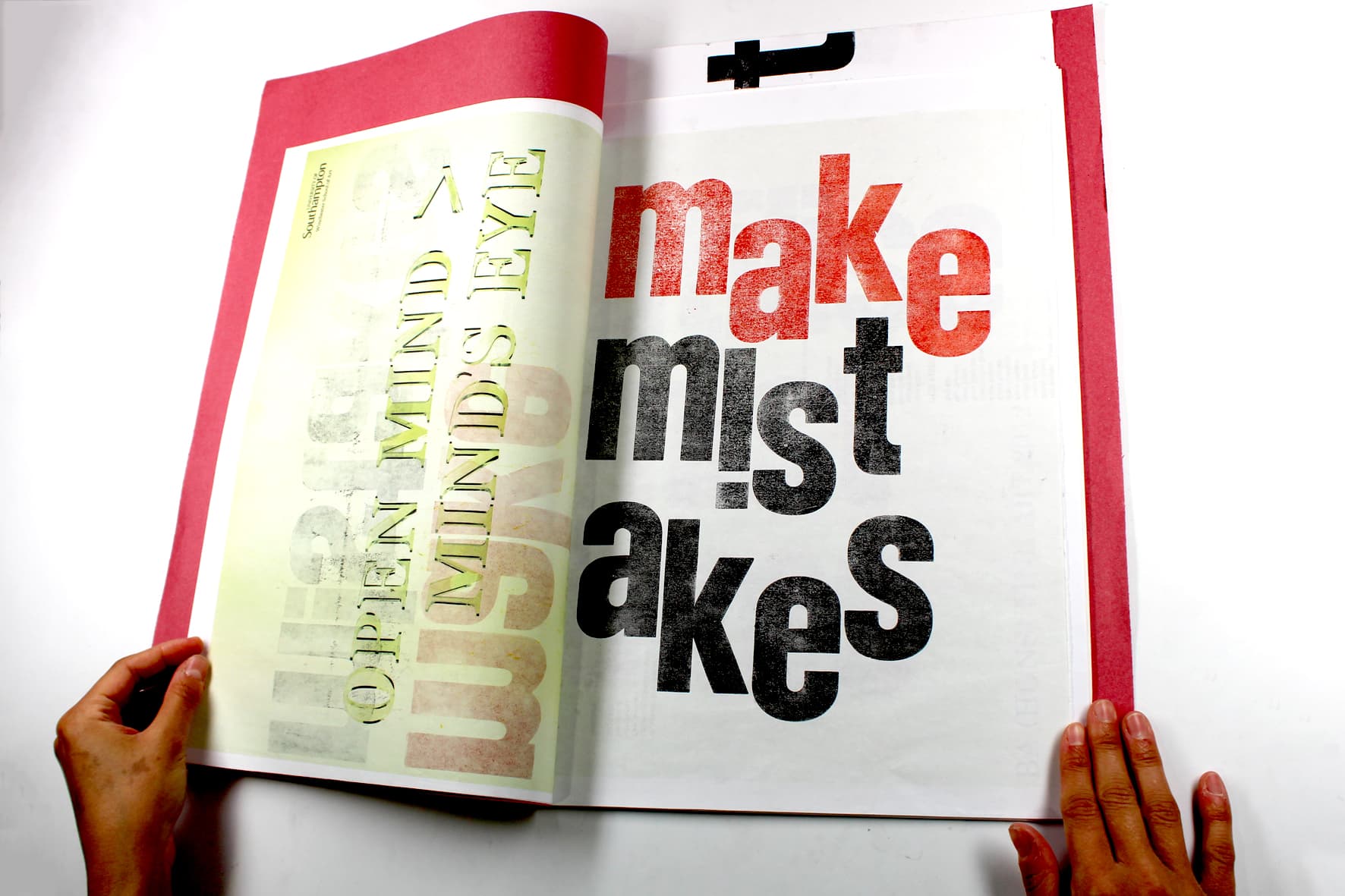
The concept challenged the idea that mistakes should simply be corrected or hidden. Instead, mistakes became part of the visual language of the work, allowing experimentation and controlled failure to generate new forms.
03 // THE GLITCH PROCESS
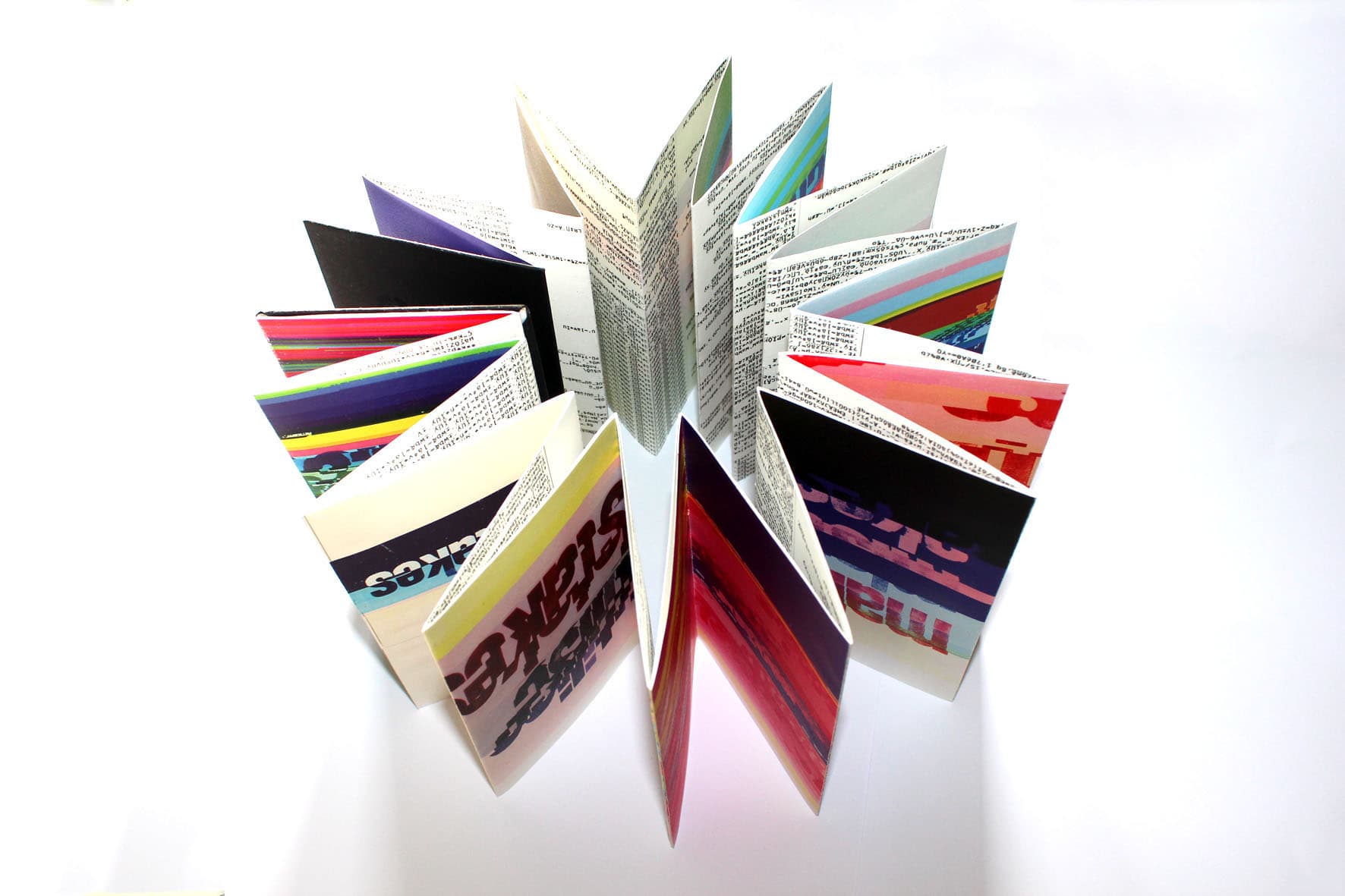
The imagery was deliberately corrupted using a controlled glitch process. JPEG script characters were replaced with the word “mistake”, creating a visual progression in which increasing levels of corruption altered the original image.

04 // THE CONCERTINA BOOK
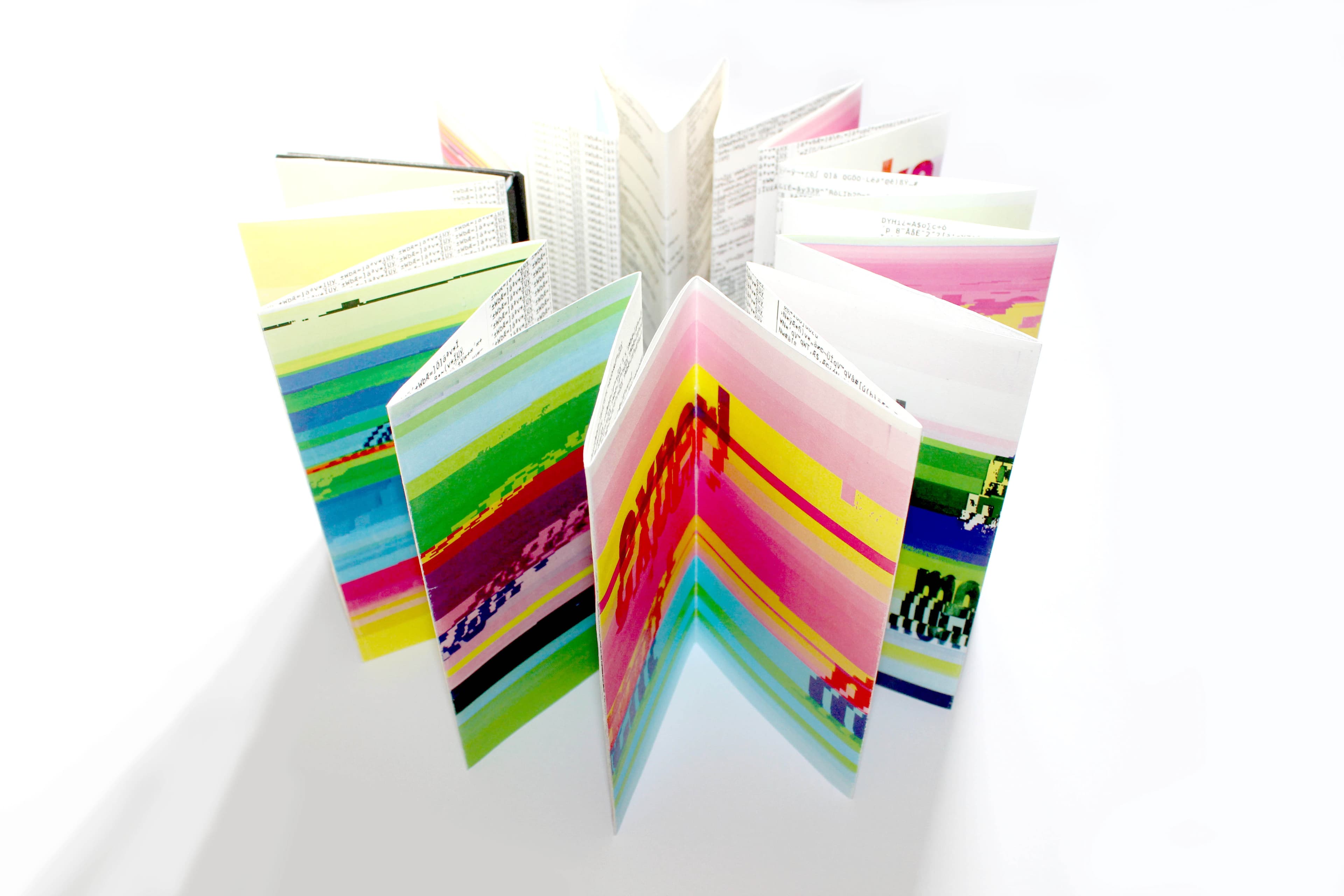
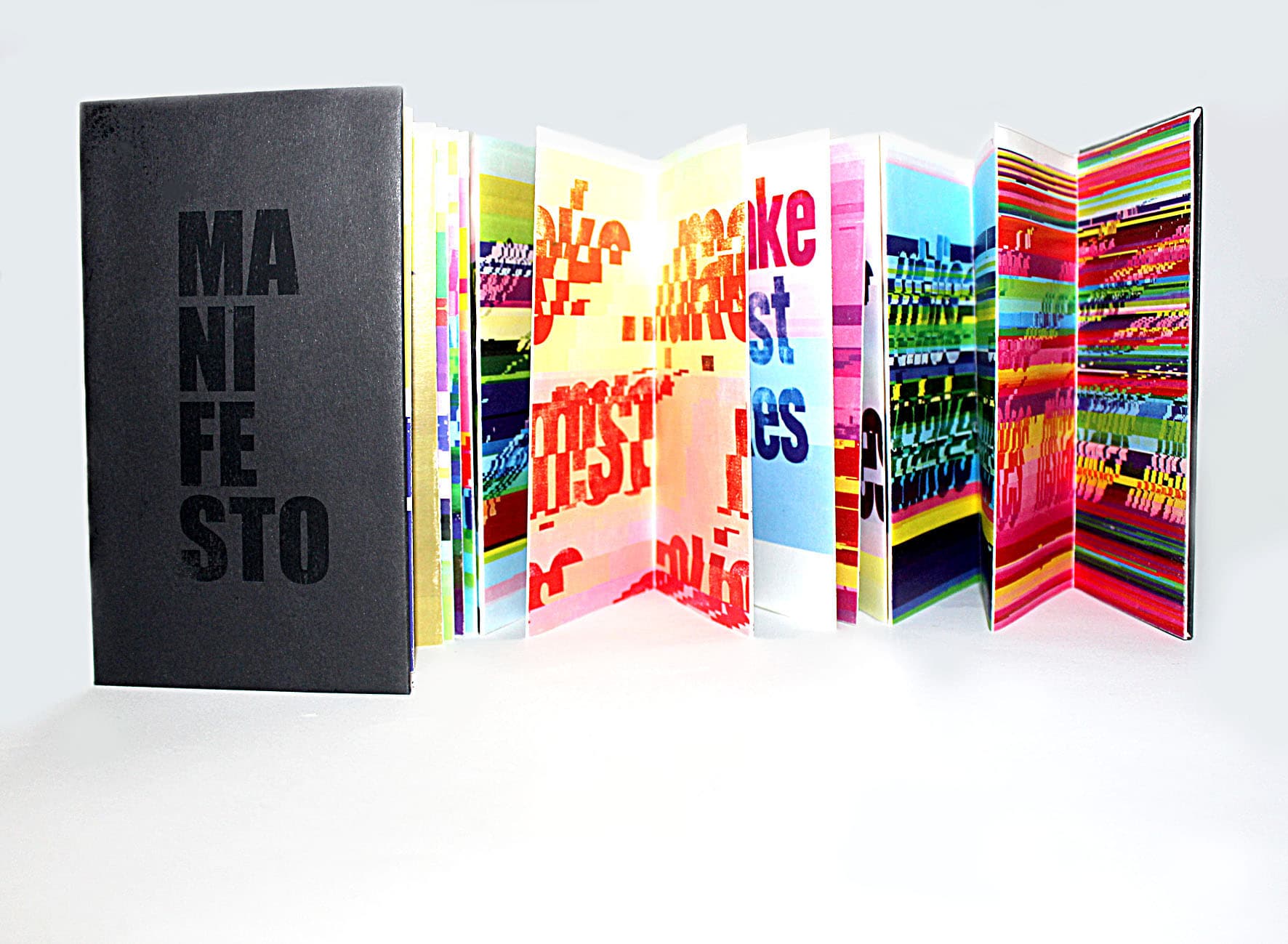
The final outcomes were assembled into a series of concertina books. The format allowed the viewer to see the transition from the original image through increasingly damaged and corrupted versions.


05 // SELECTED OUTCOMES


06 // LETTERPRESS + MATERIAL
Letterpress printing, laser printing, digital image manipulation and book binding were combined to create the final physical outcomes.

PROCESS // MATERIAL // OUTPUT
PHOTOSHOPINDESIGNLETTERPRESSLASER PRINTINGGLITCH TECHNIQUEBOOK BINDING
Archive note // Earlier creative practice, BA Graphic Design, 2014. Preserved as part of the visual archive to show the development of experimentation, print practice and visual thinking that continues into later digital work.
VISUAL ARCHIVE // EARLY PRACTICE
COLLEGE // FINAL MAJOR PROJECT
Student Handbook
DISTINCTIONGRAPHIC DESIGNEDITORIAL SYSTEM
A student handbook designed for international students, combining editorial structure, photography, typography and layered visual treatments into a cohesive information system.
01 // VISUAL LANGUAGE
Information through image, type and colour.
The handbook combines photography, large-scale typography, translucent colour blocks and repeated graphic structures to organise a substantial amount of information without relying on a conventional page hierarchy.

EDITORIAL SPREAD // INFORMATION SYSTEM
02 // EDITORIAL SYSTEM
Structured content without losing visual rhythm.
INFORMATION
Content was organised into navigable sections using repeated numbering, consistent typography and strong visual anchors.
IMAGE
Photography was treated as part of the information structure, rather than simply as supporting decoration.
03 // SELECTED PAGES
A small selection from the handbook.

COVER // FRONT

COVER // BACK
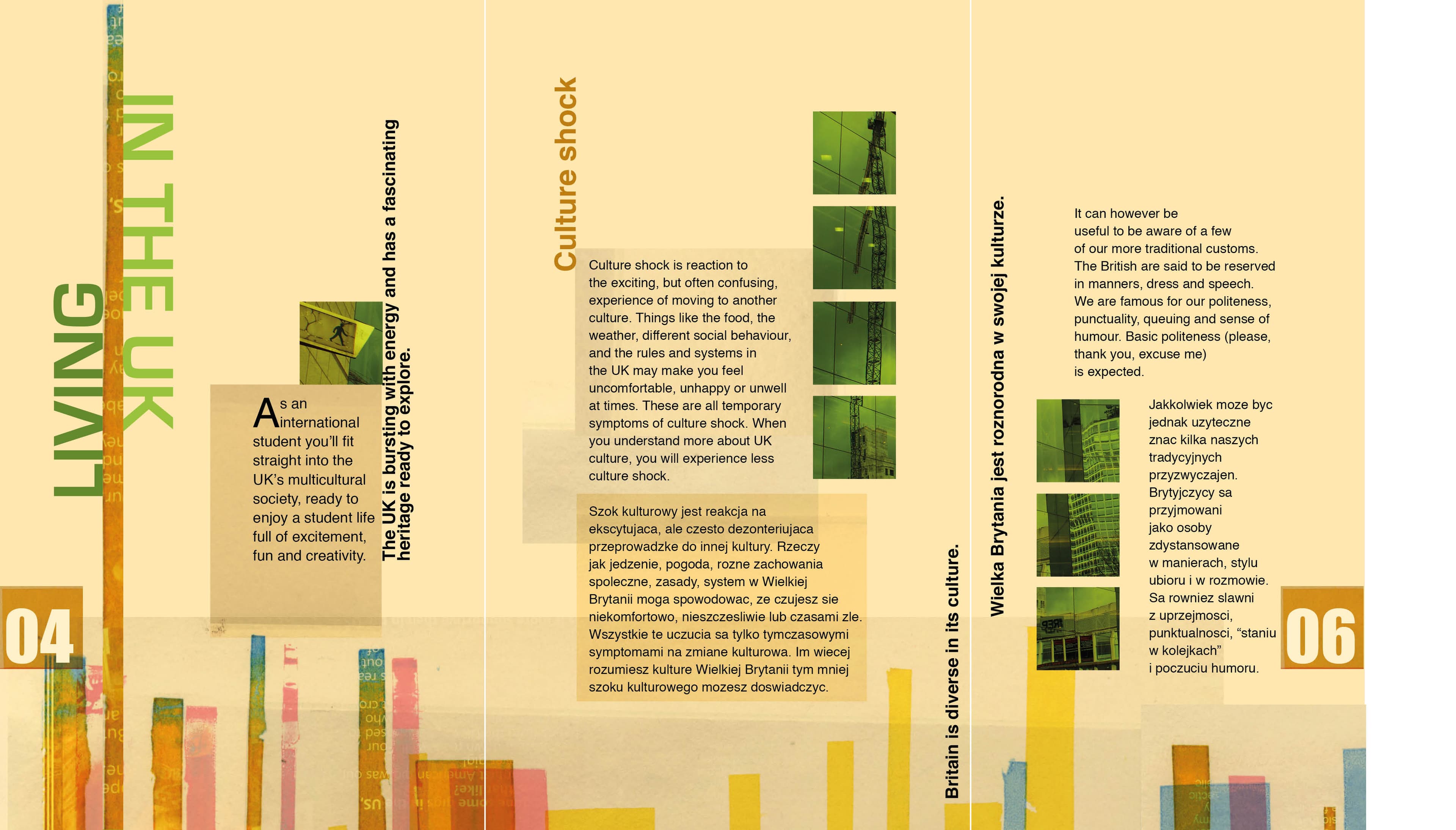
INTERIOR // SPREAD 01
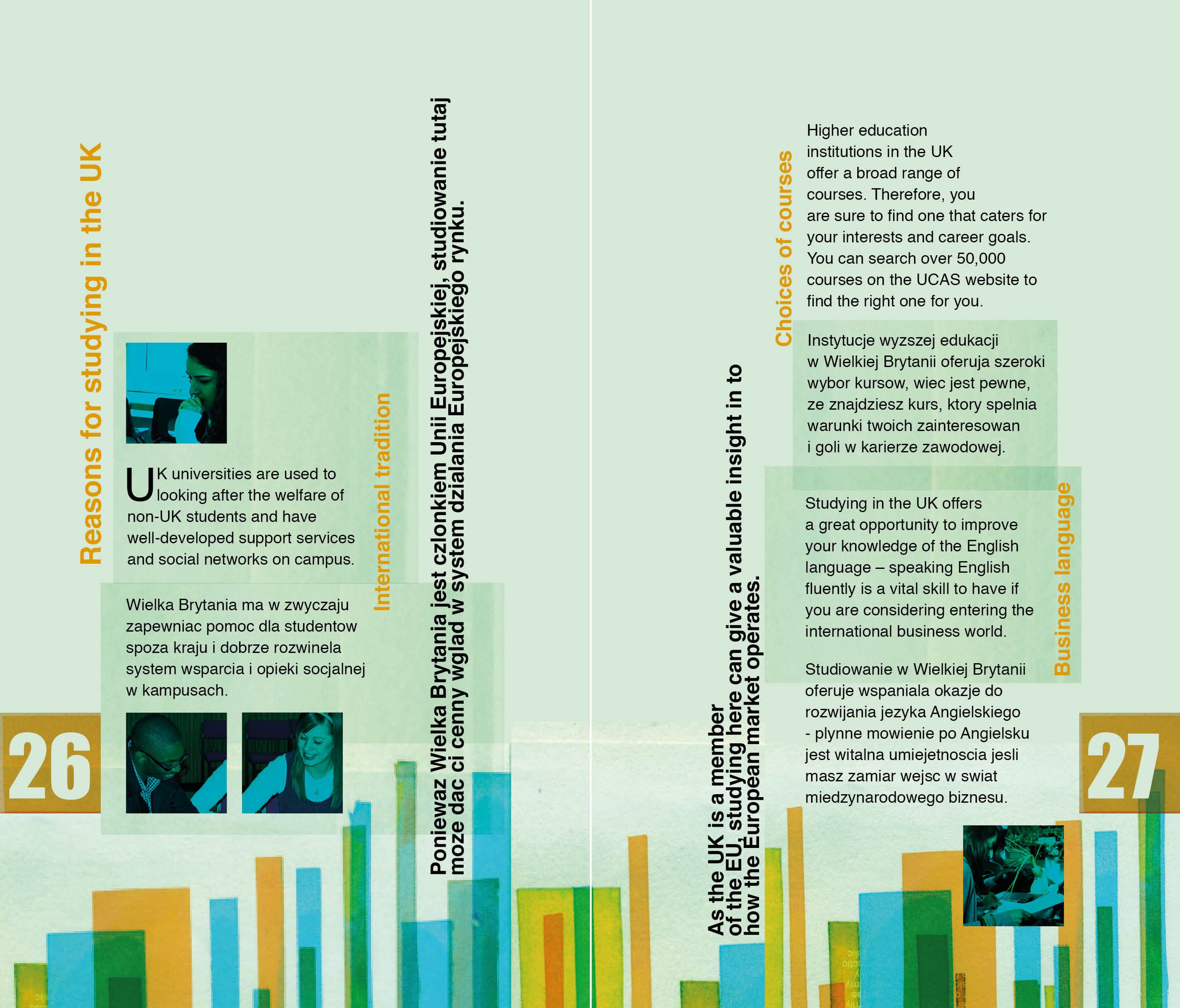
INTERIOR // SPREAD 02
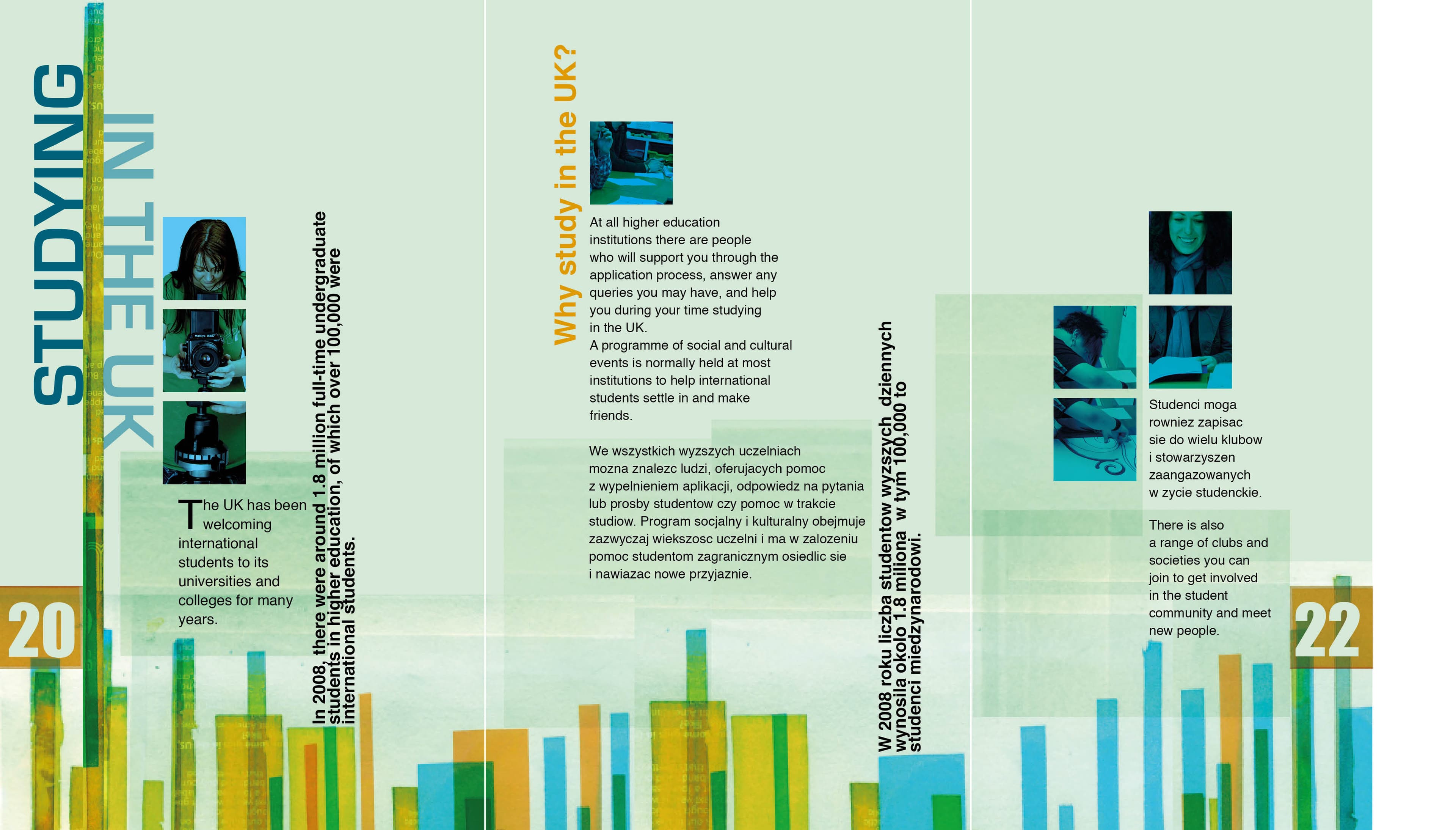
FINAL DOUBLE-PAGE SPREAD
04 // PROCESS & TOOLS
Physical and digital production.
PHOTOSHOPINDESIGNTYPOGRAPHYPHOTOGRAPHYPRINTEDITORIAL
ARCHIVE NOTE
An early example of the visual systems thinking that later became part of my work across interface design, information architecture and software development.